copilot-analysis
copilot-analysis 是一个深入剖析 GitHub Copilot 内部实现原理的开源项目。由于 Copilot 本身并未开源,其代码经过复杂的 Webpack 打包与混淆处理,普通开发者难以窥探其运作机制。该项目通过逆向工程手段,成功还原了 Copilot VSCode 插件的核心逻辑,解决了“黑盒”工具内部流程不透明的问题。
作者利用 AST(抽象语法树)技术,将压缩混淆后的单一文件智能分割为 700 多个独立模块,并自动识别和重命名关键的依赖参数(如 module、exports、require),同时优化了逗号运算符、短路写法等难以阅读的压缩语法。这使得原本晦涩难懂的源码变得清晰可读,揭示了代码提示的触发入口、核心生成方法、缓存策略及实验特性等关键细节。
该工具非常适合对 AI 编程助手原理感兴趣的后端开发者、逆向工程研究人员以及希望深入理解大模型在 IDE 中落地机制的技术爱好者。通过 copilot-analysis,用户不仅能学习到高级的 JS 逆向分析技巧,还能更透彻地理解机器学习模型如何结合上下文精准推断用户意图,从而在日常开发中更高效地利用 Copilot,或为相关领域的研究提供宝贵的参考实例。
使用场景
某安全团队在评估企业代码隐私风险时,需要深入理解 GitHub Copilot 如何提取本地代码上下文并发送至云端模型。
没有 copilot-analysis 时
- 面对经过 Webpack 压缩混淆的
extension.js,研究人员无法直接阅读源码,只能盲目猜测数据流向。 - 缺乏有效的模块分割手段,700 多个捆绑在一起的代码块难以拆解,导致定位核心逻辑如大海捞针。
- 变量名被混淆为单字符(如
e,t,n),无法识别参数含义,难以判断哪些代码片段被作为了提示词发送。 - 复杂的逗号运算符和短路写法严重阻碍静态分析,人工还原 AST 结构耗时数周且极易出错。
- 无法验证 Copilot 的缓存策略和实验特性,只能依赖官方文档的黑盒描述,存在合规盲区。
使用 copilot-analysis 后
- 利用 AST 解析技术自动将混淆的 Webpack 包分割为 752 个独立的模块文件,清晰呈现代码结构。
- 通过作用域替换自动还原
require、module和exports依赖关系,快速梳理出数据调用的完整链路。 - 智能重命名混淆参数并优化语法糖,将晦涩的压缩代码转化为可读性强的标准 JavaScript,直观暴露上下文获取逻辑。
- 自动化处理逗号表达式和闭包结构,大幅降低逆向门槛,使团队在几天内即可定位到代码提示的核心入口。
- 成功复现并分析了缓存机制与实验特性,为企业制定精准的 AI 编码工具管控策略提供了确凿的技术依据。
copilot-analysis 将原本需要数周的黑盒逆向工作缩短至数天,让开发者能透明地掌控 AI 辅助编程背后的数据隐私逻辑。
运行环境要求
- macOS
- Windows
未说明
未说明
快速开始
花了大半个月,我终于逆向分析了Github Copilot
背景
众所周知,Github Copilot是一种基于机器学习的代码自动补全工具。它使用了来自GitHub的大量代码作为训练数据,并使用OpenAI的语言模型来生成代码。Copilot还可以学习用户的编码习惯,并根据上下文推断出正确的代码片段。
在实际使用中发现大部份提示还是非常好用的,能够较为准确的推测出用户意图,甚至是基于项目其他文件的上下文进行推理。比较好奇这里是怎么做到的,于是探索了这个VSCode插件的详细实现。
准备工作
由于Copilot并没有开源,因此我们需要做一些逆向的准备。
首先,找到VSCode插件的安装目录,拿到extension.js:
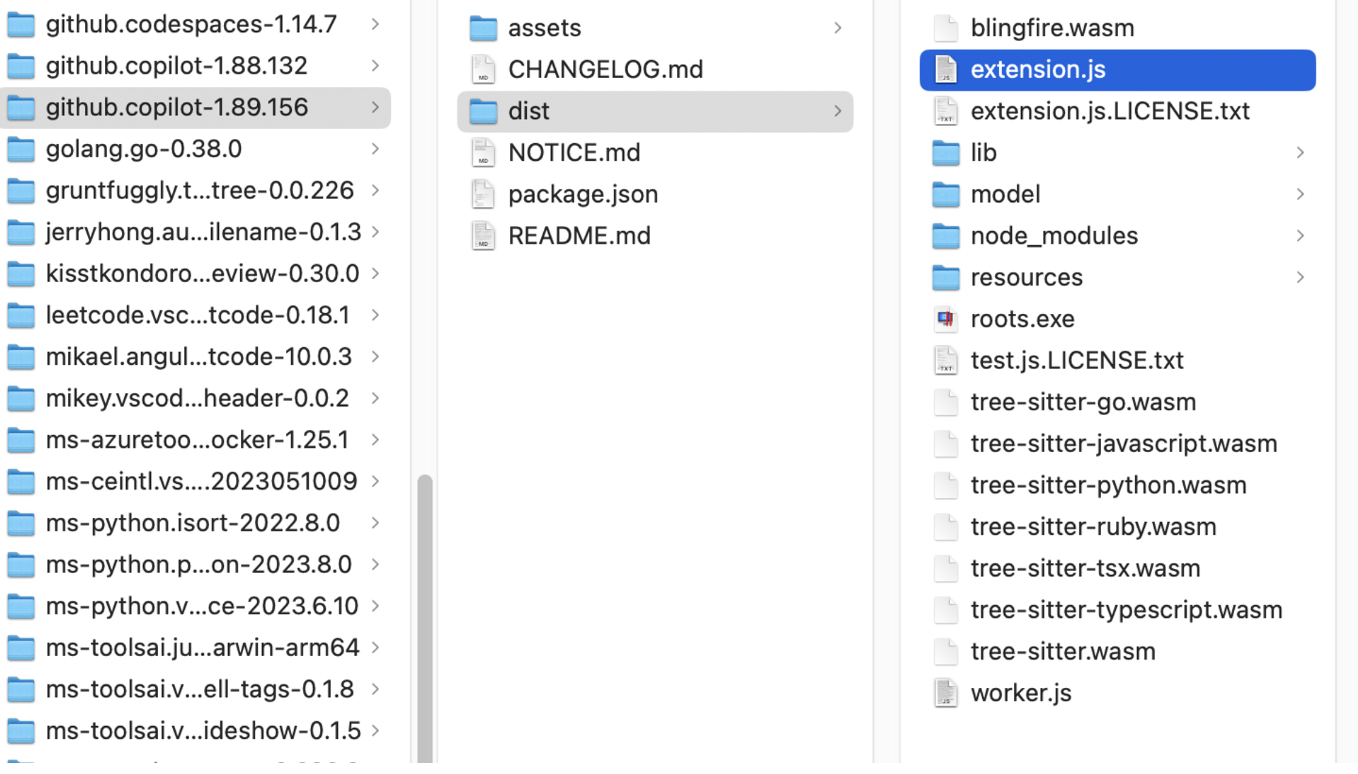
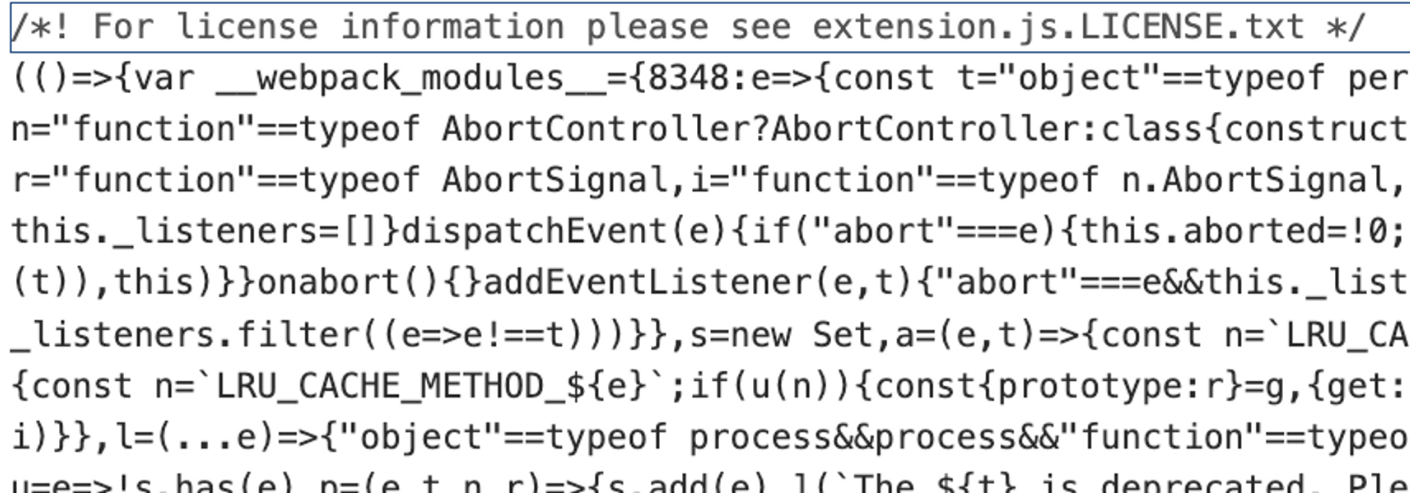
在mac下插件目录在~/.vscode下,我们可以拿到一个经过压缩混淆的文件:
1. 分割webpack_modules
针对整个webpack压缩混淆的js,我们首先要将不同的bundle识别出来,分割成单个文件,以便于后续的分析。
由于压缩后的代码存在很多不确定性,一开始打算尝试通过正则提取,但无论如何都有各种边界情况导致提取不正确,最简单的方法还是通过AST来提取。
首先,通过babel-parser将源码解析为AST:
const ast = parser.parse(source);
然后,通过babel-traverse遍历整个AST,找到modules的变量,取出里面的值:
function parseModules() {
  traverse(ast, {
    enter(path) {
      if (
        path.node.type === "VariableDeclarator" &&
        path.node.id.name === "__webpack_modules__"
      ) {
        const modules = path.node.init.properties;
        for (const module of modules) {
          const moduleId = module.key.value;
          const moduleAst = module.value;
          const moduleSource = generate(moduleAst).code;

          try {
            const ast = transformRequire(prettier(clearfyParams(moduleId, moduleSource)));

            const mainBody = ast.program.body[0].expression.body.body;
            const moduleCode = generate(types.Program(mainBody)).code;
            fs.writeFileSync(
              "./prettier/modules/" + moduleId + ".js",
              moduleCode,
              "utf8"
            );
          } catch (e) {
            console.log(e);
          }
        }
      },
    },
  });
}
最后,将处理过后的ast通过babel-generator和babel-types重新生成新的ast写入文件。
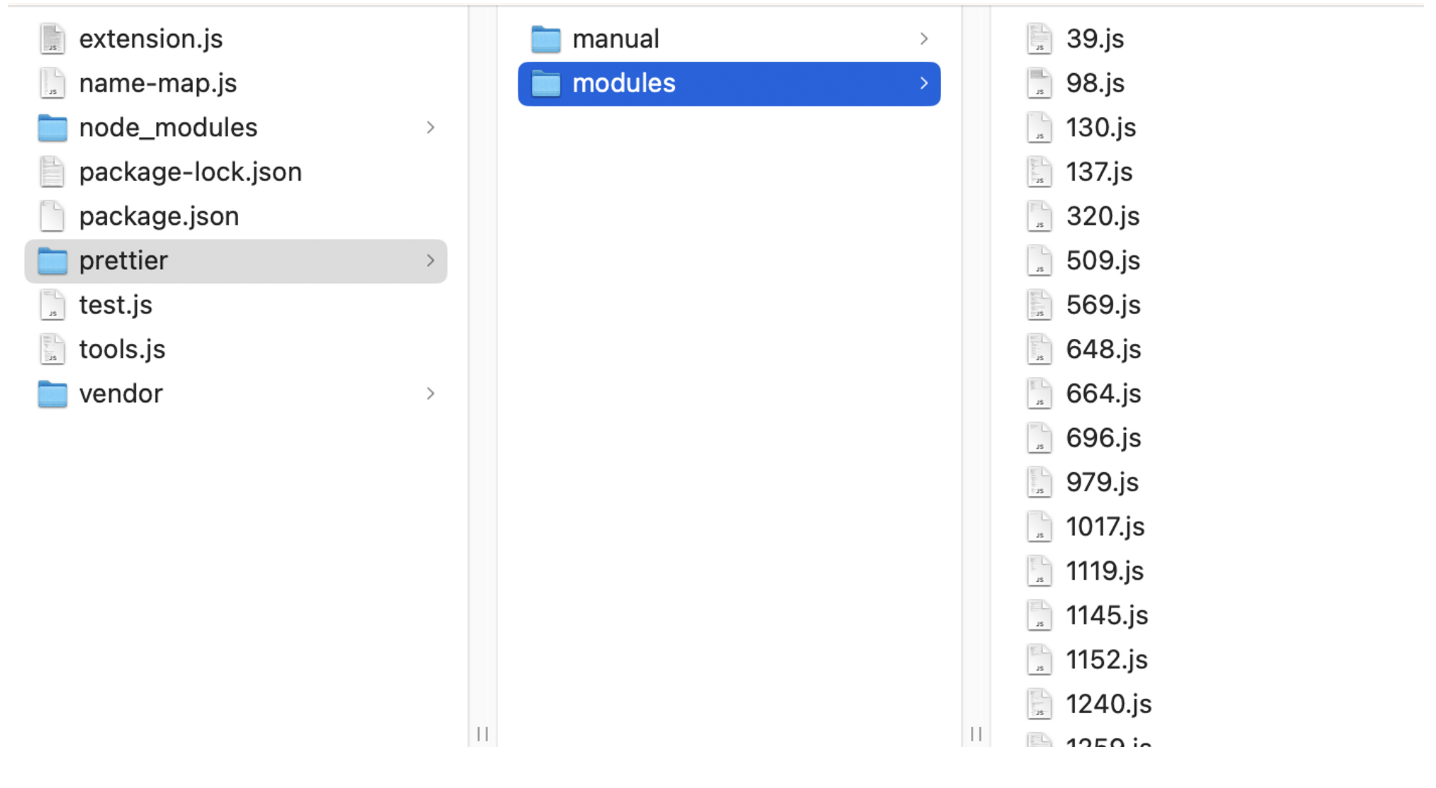
这样,我们就得到了以模块id命名的独立bundle,在我的这一版中,解析出来的copilot的bundle已经非常多了,达到752个。
2. 识别模块依赖
我们解析出来的bundle,第一层函数大概是这样:
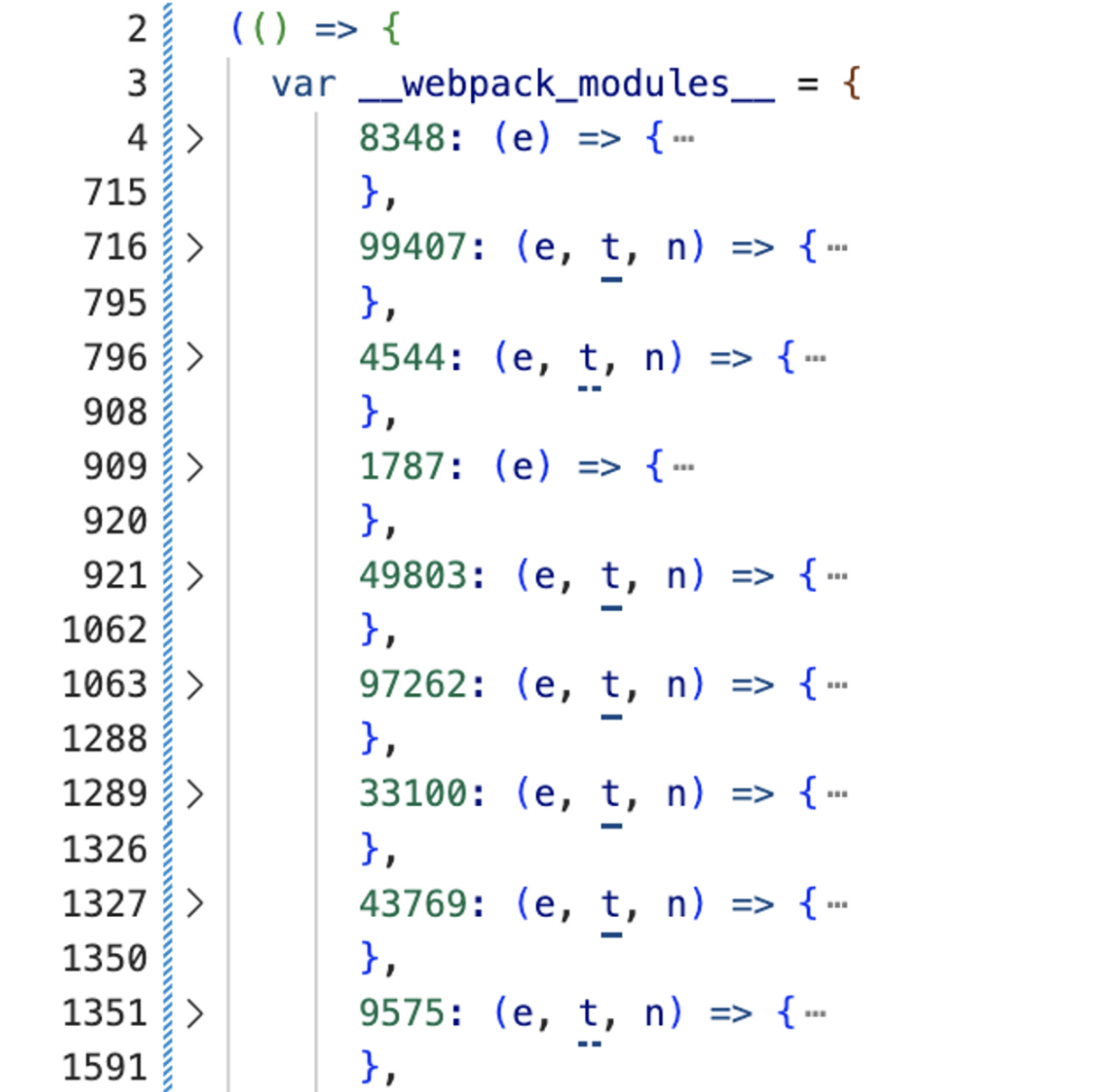
对于webpack来说,这几个参数是固定的,分别是module、exports、require,所以我们优先把这几个参数识别出来,进行作用域的替换,这样才可以看出模块间的依赖关系:
function clearfyParams(moduleId, moduleSource) {
  if (moduleSource.trim().startsWith("function")) {
    // change `function(e, t, n) {` to `(e, t, n) => {`
    moduleSource = moduleSource.replace("function", "");
    moduleSource = moduleSource.replace(")", ") =>");
  }

  const moduleAst = parser.parse(moduleSource);
  let flag = false;

  traverse(moduleAst, {
    ArrowFunctionExpression(path) {
      if (flag) return;
      const params = path.node.params;
      params.forEach((param) => {
        if (param.name === "e" || param.name === "t" || param.name === "n") {
          path.scope.rename(
            param.name,
            {
              e: "module",
              t: "exports",
              n: "require",
            }[param.name]
          );
        }
      });
      flag = true;
    },
  });
  return moduleAst;
}
这样,我们就得到了类似这样的有require和exports的代码:
var r = require(12781).Stream;
var i = require(73837);
function o() {
  this.source = null;
  this.dataSize = 0;
  this.maxDataSize = 1048576;
  this.pauseStream = !0;
  this._maxDataSizeExceeded = !1;
  this._released = !1;
  this._bufferedEvents = [];
}
module.exports = o;
3. 优化压缩后的语法
JS代码经过压缩后,会产生大量的逗号运算符、短路写法、三元表达式、括号闭包等等,非常阻碍阅读,这里参考了https://github.com/thakkarparth007/copilot-explorer 这个项目所做的一些逆向工作,对语法进行了一系列处理:
function prettier(ast) {
  const moduleTransformer = {
    // e.g., `(0, r.getConfig)(e, r.ConfigKey.DebugOverrideProxyUrl);`
    // gets transformed to r.getConfig(e, r.ConfigKey.DebugOverrideProxyUrl);
    CallExpression(path) {
      if (path.node.callee.type != "SequenceExpression") {
        return;
      }
      if (
        path.node.callee.expressions.length == 2 &&
        path.node.callee.expressions[0].type == "NumericLiteral"
      ) {
        path.node.callee = path.node.callee.expressions[1];
      }
    },
    ExpressionStatement(path) {
      if (path.node.expression.type == "SequenceExpression") {
        const exprs = path.node.expression.expressions;
        let exprStmts = exprs.map((e) => {
          return types.expressionStatement(e);
        });
        path.replaceWithMultiple(exprStmts);
        return;
      }
      if (path.node.expression.type == "AssignmentExpression") {
        // handle cases like: `a = (expr1, expr2, expr3)`
        // convert to: `expr1; expr2; a = expr3;`
        if (path.node.expression.right.type == "SequenceExpression") {
          const exprs = path.node.expression.right.expressions;
          let exprStmts = exprs.map((e) => {
            return types.expressionStatement(e);
          });
          let lastExpr = exprStmts.pop();
          path.node.expression.right = lastExpr.expression;
          exprStmts.push(path.node);
          path.replaceWithMultiple(exprStmts);
          return;
        }

        // handle cases like: `exports.GoodExplainableName = a;` where `a` is a function or a class
        // rename `a` to `GoodExplainableName` everywhere in the module
        if (
          path.node.expression.left.type == "MemberExpression" &&
          path.node.expression.left.object.type == "Identifier" &&
          path.node.expression.left.object.name == "exports" &&
          path.node.expression.left.property.type == "Identifier" &&
          path.node.expression.left.property.name != "default" &&
          path.node.expression.right.type == "Identifier" &&
          path.node.expression.right.name.length == 1
        ) {
          path.scope.rename(
            path.node.expression.right.name,
            path.node.expression.left.property.name
          );
          return;
        }
      }
      if (path.node.expression.type == "ConditionalExpression") {
        // handle cases like: `<test> ? c : d;`
        // convert to: `if (<test>) { c; } else { d; }`
        const test = path.node.expression.test;
        const consequent = path.node.expression.consequent;
        const alternate = path.node.expression.alternate;

        const ifStmt = types.ifStatement(
          test,
          types.blockStatement([types.expressionStatement(consequent)]),
          types.blockStatement([types.expressionStatement(alternate)])
        );
        path.replaceWith(ifStmt);
        return;
      }
      if (path.node.expression.type == "LogicalExpression") {
        // handle cases like: `a && b;`
        // convert to: `if (a) { b; }`
        const test = path.node.expression.left;
        const consequent = path.node.expression.right;

        const ifStmt = types.ifStatement(
          test,
          types.blockStatement([types.expressionStatement(consequent)]),
          null
        );
        path.replaceWith(ifStmt);
        return;
      }
    },
    IfStatement(path) {
      if (!path.node.test || path.node.test.type != "SequenceExpression") {
        return;
      }
      const exprs = path.node.test.expressions;
      let exprStmts = exprs.map((e) => {
        return types.expressionStatement(e);
      });
      let lastExpr = exprStmts.pop();
      path.node.test = lastExpr.expression;
      exprStmts.push(path.node);
      path.replaceWithMultiple(exprStmts);
    },
    ReturnStatement(path) {
      if (
        !path.node.argument ||
        path.node.argument.type != "SequenceExpression"
      ) {
        return;
      }
      const exprs = path.node.argument.expressions;
      let exprStmts = exprs.map((e) => {
        return types.expressionStatement(e);
      });
      let lastExpr = exprStmts.pop();
      let returnStmt = types.returnStatement(lastExpr.expression);
      exprStmts.push(returnStmt);
      path.replaceWithMultiple(exprStmts);
    },
    VariableDeclaration(path) {
      // change `const a = 1, b = 2;` to `const a = 1; const b = 2;`
      if (path.node.declarations.length > 1) {
        let newDecls = path.node.declarations.map((d) => {
          return types.variableDeclaration(path.node.kind, [d]);
        });
        path.replaceWithMultiple(newDecls);
      }
    },
  };
  traverse(ast, moduleTransformer);
  return ast;
}
4. require的模块id取名
由于压缩之后的代码,require依赖只有moduleid,已经失去了原来的文件名称,所以这里我们需要手动映射(当然也可以借助GPT)推断一下不同文件的名称,维护一个map文件,然后在ast里将模块id替换为有语义的模块名:
function transformRequire(ast) {
  const moduleTransformer = {
    VariableDeclaration(path) {
        if (path.node.declarations[0].init && path.node.declarations[0].init.type === "CallExpression") {
            if (path.node.declarations[0].init.callee.name === "require") {
                const moduleId = path.node.declarations[0].init.arguments[0].value;
                if (NameMap[moduleId]) {
                    const { name, path: modulePath} = NameMap[moduleId];

                    path.node.declarations[0].init.arguments[0].value = '"'+modulePath+'"';
                    path.scope.rename(path.node.declarations[0].id.name, name);
                }
              }
        }

    },
  };
  traverse(ast, moduleTransformer);
  return ast;
}
至此,我们逆向相关的准备工作就完成了。
入口分析
虽然前面我们已经为逆向做了大量的工作,但实际上,逆向JS代码还是一个体力活,在有限的精力下,我们也只能手动将一些上下文压缩变量进行推断替换,尽可能还原一些核心文件的代码。
入口可以很轻易找到它的模块id是91238:

经过一系列的手动优化操作,我们可以大致还原这个入口文件的原始样貌:
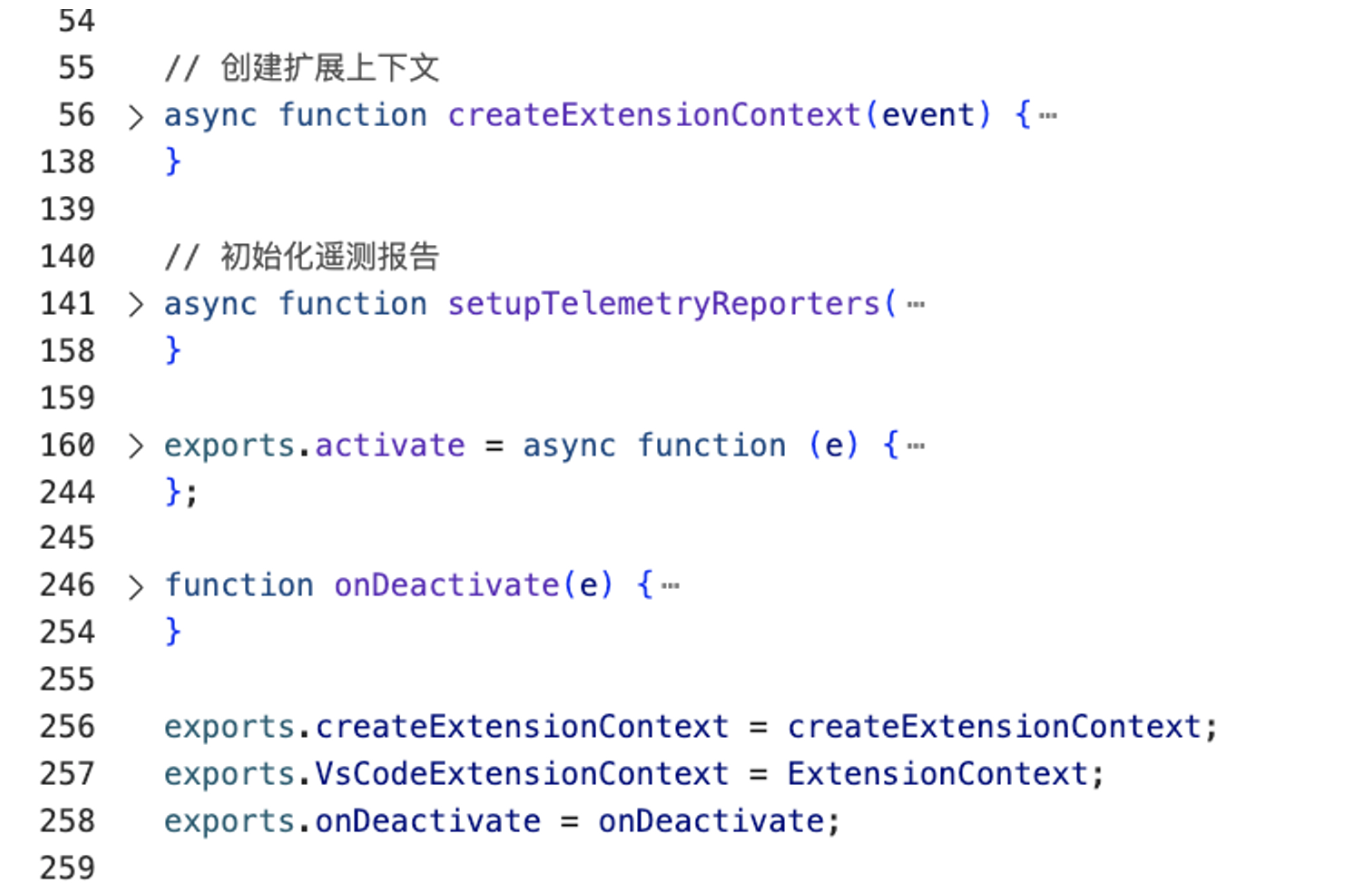
在VSCode的active函数中,copilot做了大量初始化相关的工作,以及将各个模块的示例注册到context中,后续取实例就从context上下文来取。
我们的核心还是想探索copilot的代码补全能力,入口文件的细节在这里就不展开了。
代码提示入口逻辑
代码提示逻辑是在registerGhostText中注册的:
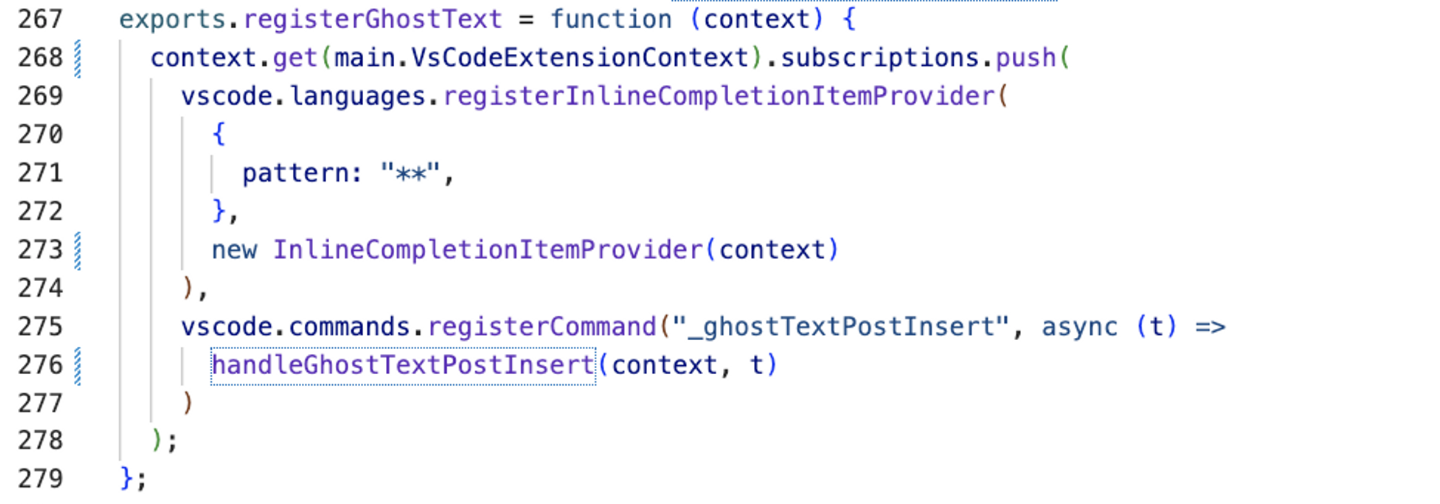
在vscode中,主要通过InlineCompletionItemProvider来实现编辑器中的代码补全能力。
整个实现的入口逻辑经过还原后大致如下:
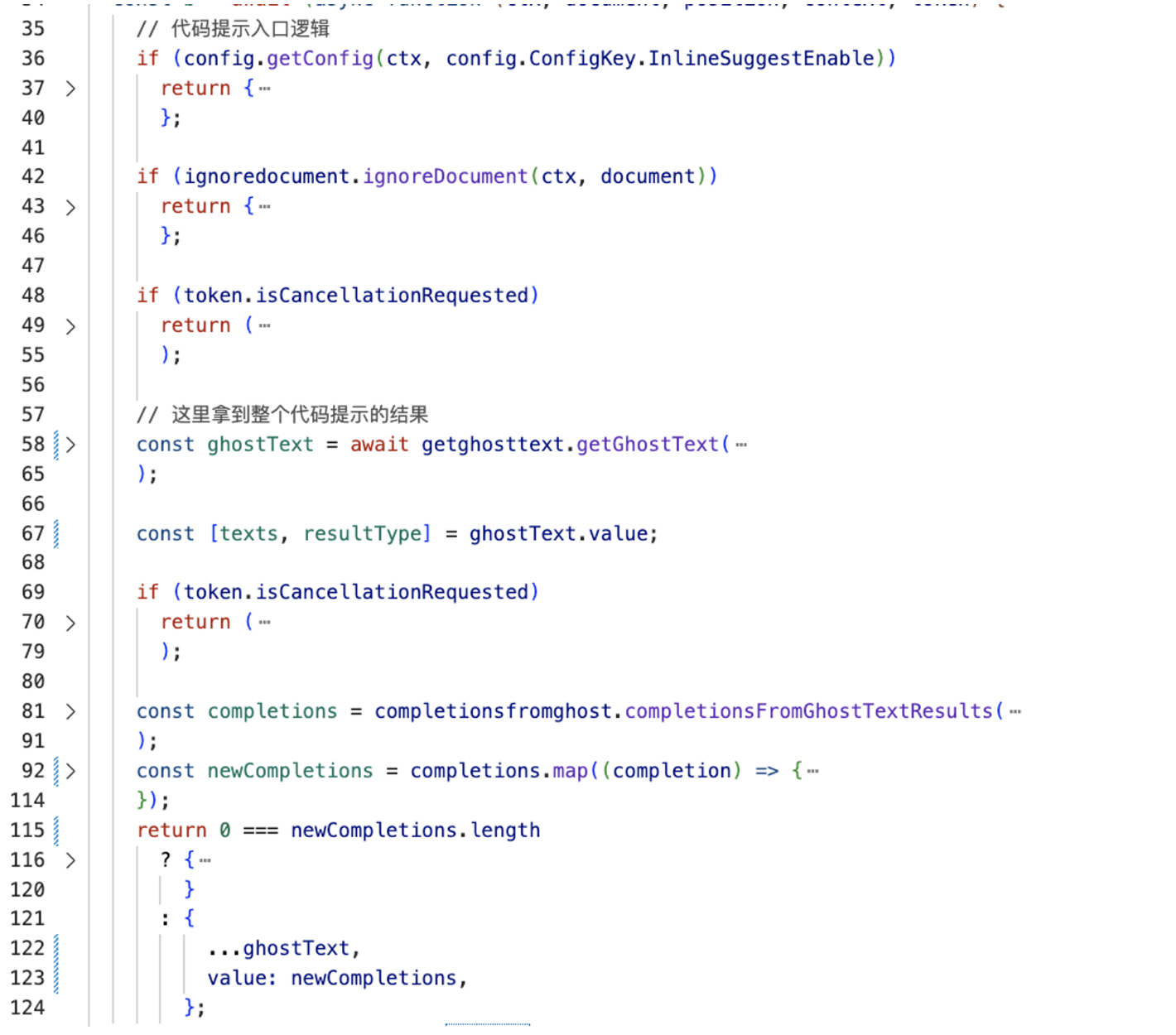
整体还是比较清晰的,它大致做了以下几件事情:
- 如果用户关闭了
InlineSuggestEnable、或者document不在处理白名单内,或者用户取消了输入,都会提前return,不进行代码提示。 - 调用
getGhostText方法拿到texts,这个大概就是最终会返回给用户的代码提示文本。 - 调用
completionsFromGhostTextResults,拿到最终的completions。这个函数比较简单,主要对文本进行了一些格式化的处理,比如处理Tab空格的问题,以及根据光标当前的位置计算出代码提示应当显示在编辑器中的坐标范围。
getGhostText核心逻辑
getGhostText是获取提示代码的核心方法,整体代码较多,我们将其拆分一下:
1. 提取Prompt
const prompt = await extractprompt.extractPrompt(ctx, document, position);
提取prompt是一个比较复杂的操作,接下来我们单独拆一小节详细分析。
2. 边界判断
if ("copilotNotAvailable" === prompt.type) {
    exports.ghostTextLogger.debug(
      ctx,
      "Copilot not available, due to the .copilotignore settings"
    );
    return {
      type: "abortedBeforeIssued",
      reason: "Copilot not available due to the .copilotignore settings",
    };
  }
  if ("contextTooShort" === prompt.type) {
    exports.ghostTextLogger.debug(ctx, "Breaking, not enough context");
    return {
      type: "abortedBeforeIssued",
      reason: "Not enough context",
    };
  }
  if (token?.isCancellationRequested) {
    exports.ghostTextLogger.info(ctx, "Cancelled after extractPrompt");
    return {
      type: "abortedBeforeIssued",
      reason: "Cancelled after extractPrompt",
    };
  }
这里的边界范围主要是三种情况:
- 包含在.copilotignore里的文件
- 上下文太少了
- 用户已经取消了
3. 二级缓存
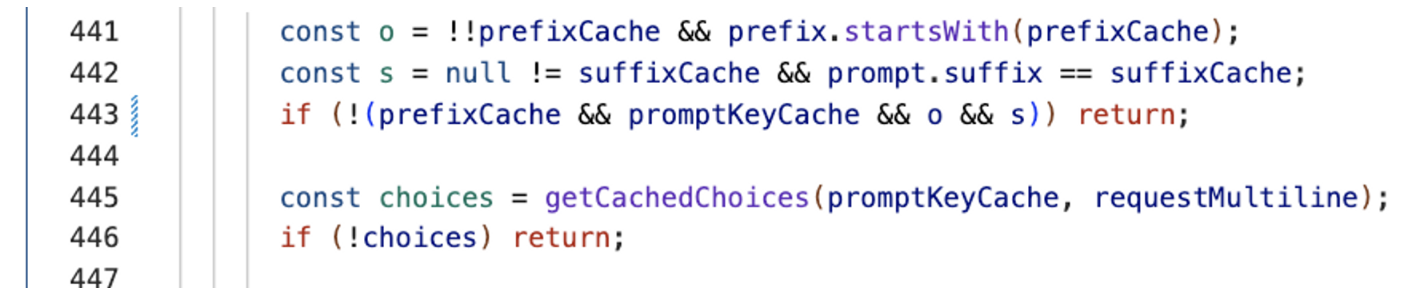
在copilot内部做了两层缓存处理,第一层缓存是保存了上一次的prefix和suffix:
function updateGlobalCacheKey(prefix, suffix, promptKey) {
  prefixCache = prefix;
  suffixCache = suffix;
  promptKeyCache = promptKey;
}
这里的promptKey是根据prefix和suffix的内容计算得到。在copilot向后台发起请求前,如果判断这次请求的prefix和suffix还是和之前的一样,则会读取缓存的内容:
紧接着,如果上一层的缓存没有命中,copilot还会计算二级缓存,会计算当前的prompt在不在缓存范围内:

在这里,copilot采取的缓存是LRU缓存策略,prompt默认会缓存100条:
exports.completionCache = new s.LRUCacheMap(100);
而keyForPrompt函数就是一个对prefix和suffix的hash:
exports.keyForPrompt = function (e) {
  return r.SHA256(e.prefix + e.suffix).toString();
};
4. 真正发起请求
到了真正到向后台发送prompt请求的时候,copilot还是做了两件比较细致的事情:
- 设置
Debounce时延 - 判断
contexualFilterScore是否达到阈值
首先,为了避免频繁向后台发送请求,copilot做了debounce,要知道模型计算是十分消耗算力的,因此在这个场景下,必须要做debounce。copilot的这个debounce也不是一般的,让我们看看它的实现细节:
exports.getDebounceLimit = async function (e, t) {
  let n;
  if ((await e.get(r.Features).debouncePredict()) && t.measurements.contextualFilterScore) {
    const e = t.measurements.contextualFilterScore;
    const r = .3475;
    const i = 7;
    n = 25 + 250 / (1 + Math.pow(e / r, i));
  } else n = await e.get(r.Features).debounceMs();
  return n > 0 ? n : 75;
};
copilot有一个预测开关,如果这个预测开关打开,会根据当前的内容相关性评分预测当前的debounce时延,这个处理就比较高级了。当然在开关没打开的情况下默认值为75ms。
其次就是contexualFilterScore 了,这个值代表的是上下文的评分,copilot会记录之前几次上下文有没有采纳的结果,貌似是通过一个简单的线性回归来预测当前的上下文被采纳的可能性,如果小于一定的阈值,则不会再给用户进行提示,优化用户体验。
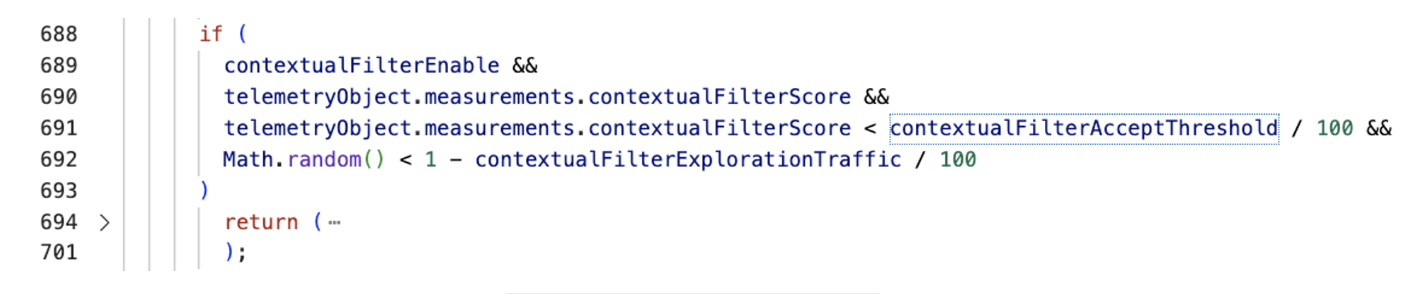
当前版本的阈值应该是35%。这个contextualFilterEnable开关默认是打开的。
最后,就是向后台真正发起请求了:

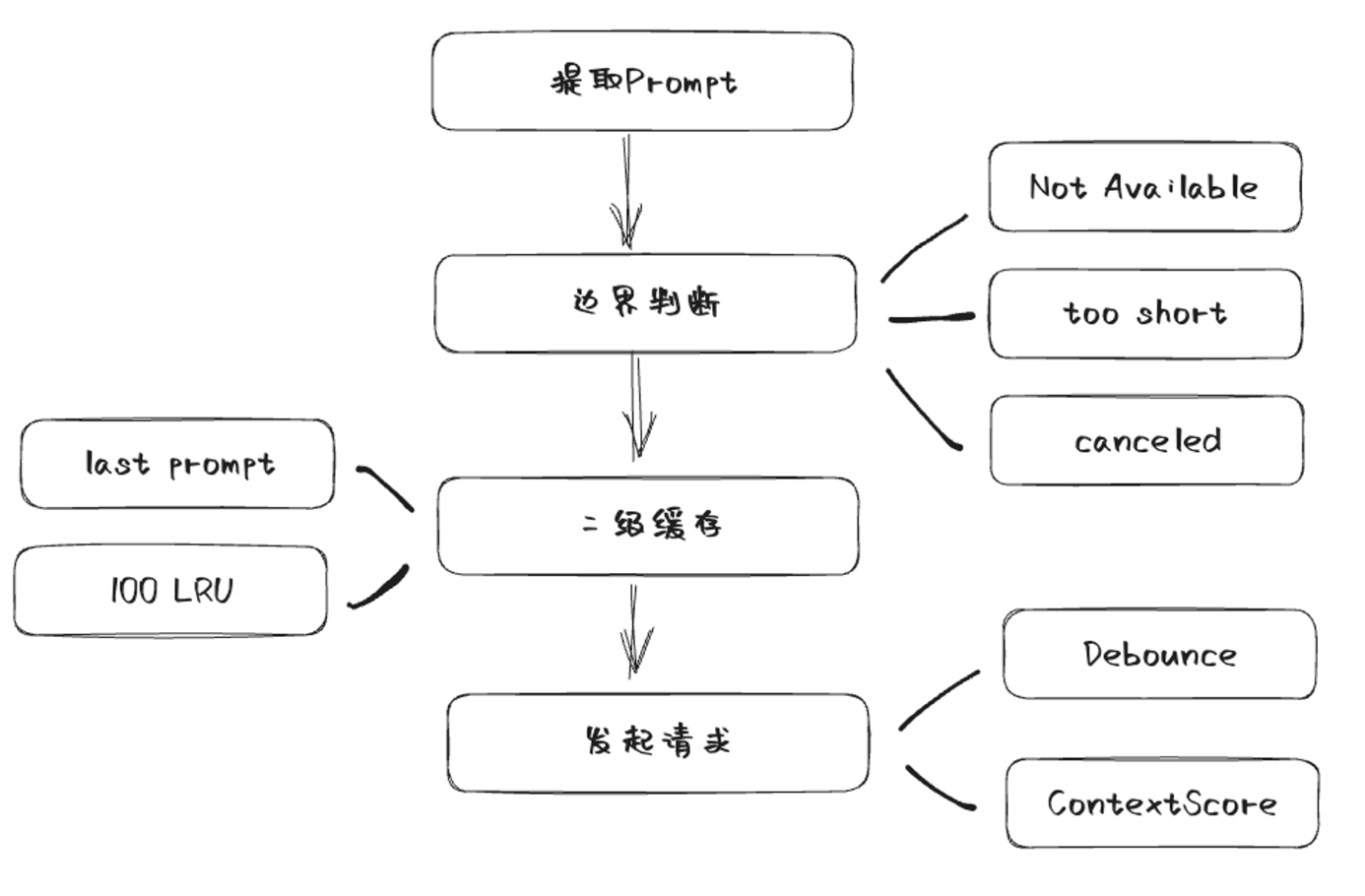
5. 流程总结
画个图总结一下copilot向后台发起请求之前做的事情:
Extract核心逻辑
Extract首层逻辑其实并不复杂,最终返回了prompt对象:
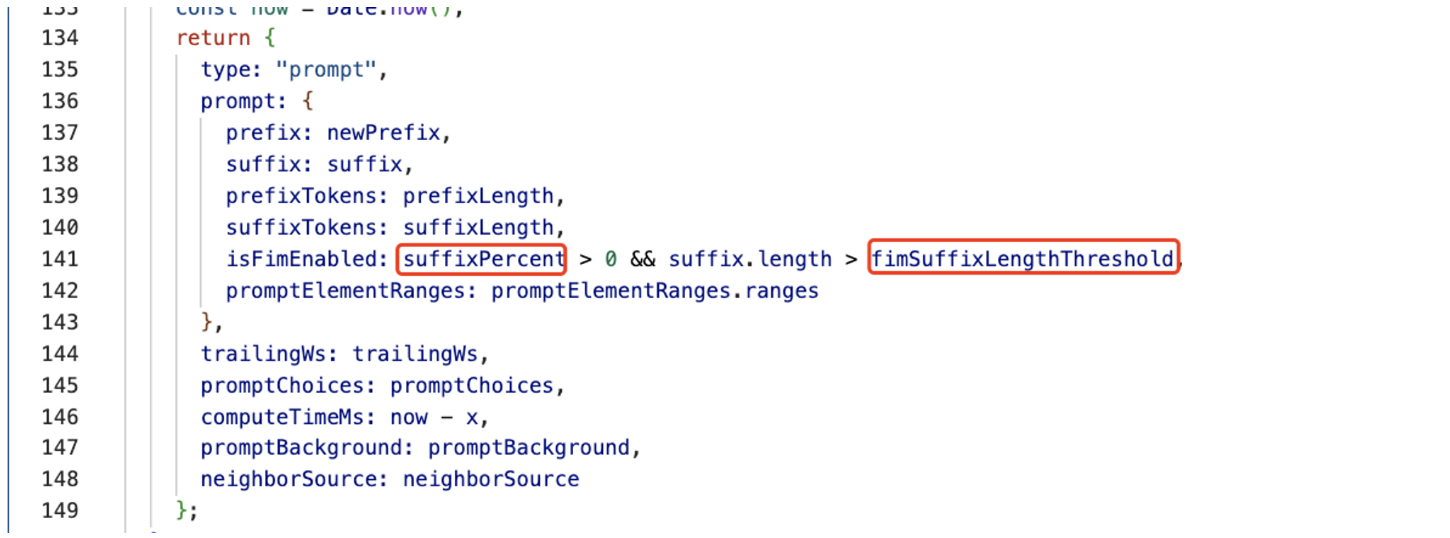
上图中用红框标出的字段来源于配置,其他的字段来自于getPrompt方法的返回,getPrompt是获取prompt的核心逻辑,这块我们接下来单独展开讨论,先来看看配置的问题。
在copilot(VSCode)体系中,有很多配置是对接了微软的AB实验平台的,可以在文件中找到这样的模块:
async fetchExperiments(e, t) {
      const n = e.get(r.Fetcher);
      let o;
      try {
        o = await n.fetch("https://default.exp-tas.com/vscode/ab", {
          method: "GET",
          headers: t
        });
      } catch (t) {
        return i.ExpConfig.createFallbackConfig(e, `Error fetching ExP config: ${t}`);
      }
      if (!o.ok) return i.ExpConfig.createFallbackConfig(e, `ExP responded with ${o.status}`);
      const s = await o.json(),
        a = s.Configs.find(e => "vscode" === e.Id) ?? {
          Id: "vscode",
          Parameters: {}
        },
        c = Object.entries(a.Parameters).map(([e, t]) => e + (t ? "" : "cf"));
      return new i.ExpConfig(a.Parameters, s.AssignmentContext, c.join(";"));
    }
这个就是拉取了ab实验的平台,很多特性开关都是通过配置下发,copilot的相关配置也不例外。
这些配置在平台没有指定的时候,都是以它的默认值。
经过我实际抓包,发现我的Copilot插件配置好像没有经过配置平台单独指定,因此整个字段应该取的默认值:
suffixPercent,默认值为15.fimSuffixLengthThreshold,默认值为0maxPromptCompletionTokens,默认值为2048neighboringTabsOption,默认值为eagerneighboringSnippetTypes,默认值为NeighboringSnippetsnumberOfSnippets,默认值为4snippetPercent,默认值为0suffixStartMode,默认值为CursorTrimStarttokenizerName,默认值为cushman002indentationMinLength,默认值为undefinedindentationMaxLength,默认值为undefinedcursorContextFix,默认值为false
这些会作为Prompt的基础配置字段传给getPrompt方法。
getPrompt核心逻辑
一些额外的配置字段
在getPrompt逻辑里,首先扩充了一系列配置字段:
languageMarker,默认值为ToppathMarker,默认值为ToplocalImportContext,默认值为DeclarationssnippetPosition,默认值为TopOfTextlineEnding,默认值为ConvertToUnixsuffixMatchThreshold,默认值为0suffixMatchCriteria,默认值为LevenshteincursorSnippetsPickingStrategy,默认值为CursorJaccard
prompt的组成
在Copilot中,prompt是由多种类型组合而成,可以在PromptElementKind中找到:
BeforeCursor,是光标前的内容AfterCursor,是光标后的内容SimilarFile,与当前文件相似度较高的内容ImportedFile:import依赖LanguageMarkder,文件开头的标记语法PathMarker,文件的路径信息
PromptElement的优先级
Copilot实现了一个优先级的辅助类,用来设置不同类型的Element优先级:
class Priorities {
  constructor() {
    this.registeredPriorities = [0, 1];
  }
  register(e) {
    if (e > Priorities.TOP || e < Priorities.BOTTOM) throw new Error("Priority must be between 0 and 1");
    this.registeredPriorities.push(e);
    return e;
  }
  justAbove(...e) {
    const t = Math.max(...e);
    const n = Math.min(...this.registeredPriorities.filter(e => e > t));
    return this.register((n + t) / 2);
  }
  justBelow(...e) {
    const t = Math.min(...e);
    const n = Math.max(...this.registeredPriorities.filter(e => e < t));
    return this.register((n + t) / 2);
  }
  between(e, t) {
    if (this.registeredPriorities.some(n => n > e && n < t) || !this.registeredPriorities.includes(e) || !this.registeredPriorities.includes(t)) throw new Error("Priorities must be adjacent in the list of priorities");
    return this.register((e + t) / 2);
  }
}
可以看到justAbove和justBelow,就是生成一个比传入优先级略高或略低的优先级,保证这个优先级在目前的情况下只比传入的优先级高或低一点。
在Copilot中,不同类型的优先级是这样产生的:
const beforeCursorPriority = priorities.justBelow(p.Priorities.TOP);
  const languageMarkerPriority =
    promptOpts.languageMarker === h.Always
      ? priorities.justBelow(p.Priorities.TOP)
      : priorities.justBelow(beforeCursorPriority);
  const pathMarkerPriority =
    promptOpts.pathMarker === f.Always ? priorities.justBelow(p.Priorities.TOP) : priorities.justBelow(beforeCursorPriority);
  const importedFilePriority = priorities.justBelow(beforeCursorPriority);
  const lowSnippetPriority = priorities.justBelow(importedFilePriority);
  const highSnippetPriority = priorities.justAbove(beforeCursorPriority);
这里可以简单推断一下:
beforeCursorPriority,为0.5languageMarkerPriority,为0.25pathMarkderPriority,为0.375importedFilePriority,为0.4375lowSnippetPriority,为0.40625highSnippetPriority,为0.75
所以在默认的场景下,这几种类型的优先级排序为:highSnippetPriority > beforeCursorPriority > importedFilePriority > lowSnippetPriority > pathMarkderPriority > languageMarkerPriority
PromptElement主要内容
- languageMarker和pathMarker
languageMarker和pathMarker是最先被放进promptWishList中的,经过前面的分析,我们知道在配置中,languageMarker和pathMarker都是有默认值的,因此下面的判断分支一定会走到:
  if (promptOpts.languageMarker !== h.NoMarker) {
      const e = newLineEnded(r.getLanguageMarker(resourceInfo));
      languageMarkerId = promptWishlist.append(e, p.PromptElementKind.LanguageMarker, languageMarkerPriority);
    }
    if (promptOpts.pathMarker !== f.NoMarker) {
      const e = newLineEnded(r.getPathMarker(resourceInfo));
      if (e.length > 0) {
        pathMarkerId = promptWishlist.append(e, p.PromptElementKind.PathMarker, pathMarkerPriority);
      }
    }
这两个函数实现也比较简单,我们先来看一下getLanguageMarker:

```jsx
exports.getLanguageMarker = function (e) {
  const {
    languageId: t
  } = e;
  return -1 !== n.indexOf(t) || hasLanguageMarker(e) ? "" : t in r ? r[t] : comment(`Language: ${t}`, t);
};
```

这里首先确认了languageId,不在ignoreList当中,在copilot中,有两种语言是被排除在外的:

```jsx
const n = ["php", "plaintext"];
```

其次再看一下语言本身是否有标记语法,在这个Map中(HTML、Python、Ruby、Shell、YAML):

```jsx
const r = {
  html: "<!DOCTYPE html>",
  python: "#!/usr/bin/env python3",
  ruby: "#!/usr/bin/env ruby",
  shellscript: "#!/bin/sh",
  yaml: "# YAML data"
};
```

其余的情况就返回一行注释,类似这样:

```jsx
// Language: ${languageId}
```

getPathMarker逻辑更简单些,只是一行注释,标明文件路径(暂时搞不清楚这个信息给模型有什么用,可能路径里面包含了目录结构信息和文件名帮助模型更好进行推断?):

```jsx
exports.getPathMarker = function (e) {
  return e.relativePath ? comment(`Path: ${e.relativePath}`, e.languageId) : "";
};
```
- localImportContext
localImportContext的实现要复杂一点,通过上面的配置我们可以看到这个也是默认有值的,会进到下面这个分支当中:
```jsx
if (promptOpts.localImportContext !== y.NoContext)
    for (const e of await i.extractLocalImportContext(resourceInfo, promptOpts.fs))
      promptWishlist.append(newLineEnded(e), p.PromptElementKind.ImportedFile, importedFilePriority);
```

extractLocalImportContext是一个异步函数,让我们看一下这里面的实现:

```jsx
const reg = /^\s*import\s*(type|)\s*\{[^}]*\}\s*from\s*['"]\./gm;
  exports.extractLocalImportContext = async function (resourceInfo, fs) {
    let {
      source: source,
      uri: uri,
      languageId: languageId
    } = resourceInfo;
    return fs && "typescript" === languageId ? async function (source, uri, fs) {
      let language = "typescript";
      let result = [];
      const importEndIndex = function (source) {
        let match;
        let lastIndex = -1;
        reg.lastIndex = -1;
        do {
            match = reg.exec(source);
          if (match) {
            lastIndex = reg.lastIndex + match.length;
          }
        } while (match);
        if (-1 === lastIndex) return -1;
        const nextNewLine = source.indexOf("\n", lastIndex);
        return -1 !== nextNewLine ? nextNewLine : source.length;
      }(source);
      if (-1 === importEndIndex) return result;
      source = source.substring(0, importEndIndex);
      let ast = await i.parseTreeSitter(language, source);
      try {
        for (let node of function (node) {
          let t = [];
          for (let childNode of node.namedChildren) if ("import_statement" === childNode.type) {
            t.push(childNode);
          }
          return t;
        }(ast.rootNode)) {
          let filePath = getTSFilePath(uri, node);
          if (!filePath) continue;
          let namedImports = parseNamedImport(node);
          if (0 === namedImports.length) continue;
          let exports = await getExports(filePath, language, fs);
          for (let e of namedImports) if (exports.has(e.name)) {
            result.push(...exports.get(e.name));
          }
        }
      } finally {
        ast.delete();
      }
      return result;
    }(source, uri, fs) : [];
  }
```

首先我们可以关注到的是,这个函数先判断了Typescript的语言,也就意味着当前版本的Copilot,只对ts文件的import依赖做了处理。

这个函数之所以是异步的,就是这里要拿到import语句的语法树,这个过程比较复杂,copilot是使用了wasm的方式,通过tree-sitter来解析语法树的,这个过程是异步的。

最后,copilot提取出所有的import,并且返回了所有named import对应的export代码,也就是最终索引到了依赖文件,将用到的export都作为上下文extract出来。
- snippets
snippets的处理是比较复杂的,在Copilot中,首先拿到了一个snippets:
```jsx
const snippets = [
...retrievalSnippets,
...(promptOpts.neighboringTabs === a.NeighboringTabsOption.None || 0 === neighborDocs.length
? []
: await a.getNeighborSnippets(
resourceInfo,
neighborDocs,
promptOpts.neighboringSnippetTypes,
promptOpts.neighboringTabs,
promptOpts.cursorContextFix,
promptOpts.indentationMinLength,
promptOpts.indentationMaxLength,
promptOpts.snippetSelection,
promptOpts.snippetSelectionK,
lineCursorHistory,
promptOpts.cursorSnippetsPickingStrategy
)),
];
```
在默认的场景下,`retrievalSnippets`是空的,而`neighboringTabs`在我们前面的分析中是`eager`,所以会通过`getNeighborSnippets`去拿到这个数组。
注意这里传入了`neighborDocs`,这个是在extract的入口就传过来的,对应的代码是:
```jsx
let neighborDocs = [];
let neighborSource = new Map();
try {
const t = await u.NeighborSource.getNeighborFiles(ctx, uri, repoUserData);
neighborDocs = t.docs;
neighborSource = t.neighborSource;
} catch (t) {
telemetry.telemetryException(ctx, t, "prompt.getPromptForSource.exception");
}
```
在默认的情况下,这里拿到的fileType是`OpenTabs`,所以会默认通过VSCode拿到目前打开的tab中,包含同类型语言文件的所有内容(按访问时间排序),对应的代码如下:
```jsx
exports.OpenTabFiles = class {
constructor(e, t) {
this.docManager = e;
this.neighboringLanguageType = t;
}
async truncateDocs(e, t, n, r) {
const o = [];
let s = 0;
for (const a of e) if (!(s + a.getText().length > i.NeighborSource.MAX_NEIGHBOR_AGGREGATE_LENGTH) && ("file" == a.uri.scheme && a.fileName !== t && i.considerNeighborFile(n, a.languageId, this.neighboringLanguageType) && (o.push({
uri: a.uri.toString(),
relativePath: await this.docManager.getRelativePath(a),
languageId: a.languageId,
source: a.getText()
}), s += a.getText().length), o.length >= r)) break;
return o;
}
async getNeighborFiles(e, t, n, o) {
let s = [];
const a = new Map();
s = await this.truncateDocs(utils2.sortByAccessTimes(this.docManager.textDocuments), e.fsPath, n, o);
a.set(i.NeighboringFileType.OpenTabs, s.map(e => e.uri));
return {
docs: s,
neighborSource: a
};
}
};
```
接着我们来看一下`getNeighborSnippets`的实现:
```jsx
exports.getNeighborSnippets = async function (
resourceInfo,
neighborDocs,
neighboringSnippetTypes,
neighboringTabs,
cursorContextFix,
indentationMinLength,
indentationMaxLength,
snippetSelection,
snippetSelectionK,
lineCursorHistory,
cursorSnippetsPickingStrategy
) {
const options = {
...exports.neighborOptionToSelection[neighboringTabs],
};
const y = (function (
resourceInfo,
neighboringSnippetTypes,
options,
cursorContextFix,
indentationMinLength,
indentationMaxLength,
lineCursorHistory,
cursorSnippetsPickingStrategy = i.CursorSnippetsPickingStrategy
.CursorJaccard
) {
let d;
if (neighboringSnippetTypes === s.NeighboringSnippets) {
d =
void 0 !== indentationMinLength && void 0 !== indentationMaxLength
? o.IndentationBasedJaccardMatcher.FACTORY(
indentationMinLength,
indentationMaxLength,
cursorContextFix
)
: o.FixedWindowSizeJaccardMatcher.FACTORY(
options.snippetLength,
cursorContextFix
);
} else {
if (neighboringSnippetTypes === s.NeighboringFunctions) {
d = o.FunctionJaccardMatcher.FACTORY(
options.snippetLength,
cursorContextFix,
indentationMinLength,
indentationMaxLength
);
} else {
r.ok(
void 0 !== lineCursorHistory,
"lineCursorHistory should not be undefined"
);
d = i.CursorHistoryMatcher.FACTORY(
options.snippetLength,
lineCursorHistory,
cursorSnippetsPickingStrategy,
cursorContextFix
);
}
}
return d.to(resourceInfo);
})(
resourceInfo,
neighboringSnippetTypes,
options,
cursorContextFix,
indentationMinLength,
indentationMaxLength,
lineCursorHistory,
cursorSnippetsPickingStrategy
);
return 0 === options.numberOfSnippets
? []
: (
await neighborDocs
.filter((e) => e.source.length < 1e4 && e.source.length > 0)
.slice(0, 20)
.reduce(
async (e, t) =>
(
await e
).concat(
(
await y.findMatches(t, snippetSelection, snippetSelectionK)
).map((e) => ({
relativePath: t.relativePath,
...e,
}))
),
Promise.resolve([])
)
)
.filter((e) => e.score && e.snippet && e.score > options.threshold)
.sort((e, t) => e.score - t.score)
.slice(-options.numberOfSnippets);
};
```
在这个实现中,我们可以得到以下关键信息:
- neighboringSnippetTypes默认为NeighboringSnippets,所以会走到`FixedWindowSizeJaccardMatcher`的逻辑里
- 返回值是根据neighborDocs的内容,过滤掉过小和过大文件,经过findMatchers拿到的结果
- 最后过滤掉score较低的,不过threshold默认为0,所以这里应该保留了所有的内容
- 根据score进行排序,选取较大的4条(numberOfSnippets默认为4)
紧接着我们就来看看`FixedWindowSizeJaccardMatcher`的逻辑:
```jsx
class FixedWindowSizeJaccardMatcher extends i.WindowedMatcher {
constructor(resourceInfo, snippetLength, cursorContextFix) {
super(resourceInfo, cursorContextFix);
this.windowLength = snippetLength;
this.cursorContextFix = cursorContextFix;
}
id() {
return "fixed:" + this.windowLength;
}
getWindowsDelineations(e) {
return o.getBasicWindowDelineations(this.windowLength, e);
}
trimDocument(e) {
return e.source.slice(0, e.offset).split("\n").slice(-this.windowLength).join("\n");
}
_getCursorContextInfo(e) {
return r.getCursorContext(e, {
maxLineCount: this.windowLength,
cursorContextFix: this.cursorContextFix
});
}
similarityScore(e, t) {
return computeScore(e, t);
}
}
```
这里的`snippetLength` 在eager的情况下默认为60,也就意味着snippet最多不超过60行。
这个类继承了`WindowedMatcher`,findMatches就在WindowedMatcher里:
```jsx
async findMatches(e, t = i.SnippetSelectionOption.BestMatch, n) {
if (t == i.SnippetSelectionOption.BestMatch) {
const t = await this.findBestMatch(e);
return t ? [t] : [];
}
return t == i.SnippetSelectionOption.TopK && (await this.findTopKMatches(e, n)) || [];
}
```
在这里第二个参数其实默认是undefined,所以默认走到BestMatch的分支:
```jsx
async findBestMatch(e) {
if (0 === e.source.length || 0 === this.referenceTokens.size) return;
const t = e.source.split("\n");
const n = this.retrieveAllSnippets(e, s.Descending);
return 0 !== n.length && 0 !== n[0].score ? {
snippet: t.slice(n[0].startLine, n[0].endLine).join("\n"),
semantics: o.SnippetSemantics.Snippet,
provider: o.SnippetProvider.NeighboringTabs,
...n[0]
} : void 0;
}
```
可以看到所谓BestMatch,就是取出`retrieveAllSnippets` 的第0条结果作为snippet返回。
```jsx
retrieveAllSnippets(e, t = s.Descending) {
const n = [];
if (0 === e.source.length || 0 === this.referenceTokens.size) return n;
const sourceArr = e.source.split("\n");
const key = this.id() + ":" + e.source;
const result = c.get(key) ?? [];
const noCache = 0 == result.length;
const tokens = noCache ? sourceArr.map(this.tokenizer.tokenize, this.tokenizer) : [];
for (const [index, [startLine, endLine]] of this.getWindowsDelineations(sourceArr).entries()) {
if (noCache) {
const e = new Set();
tokens.slice(startLine, endLine).forEach(t to add to the set);
result.push(e);
}
const r = result[index];
const s = this.similarityScore(r, this.referenceTokens);
n.push({
score: s,
startLine: startLine,
endLine: endLine
});
}
if (noCache) {
c.put(key, result);
}
return this.sortScoredSnippets(n, t);
}
```
这段代码的核心是根据窗口计算出不同的代码片段与当前文件的相似度,并返回排序后的片段列表。
首先这里做了个缓存处理,用来缓存已经计算过相似度的代码;
然后我们重点关注下这里的几个逻辑:
- 经过tokenize获取到当前代码片段每一行的token
- 通过getWindowsDelineations将代码分割成不同的小窗口(步长为1)
- 每个窗口的token和当前文件(referenceDoc)的token做一次相似度计算(`Jaccard`相似度)
这三个点都非常关键,我们展开来分析下:
1. **tokenize计算每一行的token**
```jsx
const p = new Set(["we", "our", "you", "it", "its", "they", "them", "their", "this", "that", "these", "those", "is", "are", "was", "were", "be", "been", "being", "have", "has", "had", "having", "do", "does", "did", "doing", "can", "don", "t", "s", "will", "would", "should", "what", "which", "who", "when", "where", "why", "how", "a", "an", "the", "and", "or", "not", "no", "but", "because", "as", "until", "again", "further", "then", "once", "here", "there", "all", "any", "both", "each", "few", "more", "most", "other", "some", "such", "above", "below", "to", "during", "before", "after", "of", "at", "by", "about", "between", "into", "through", "from", "up", "down", "in", "out", "on", "off", "over", "under", "only", "own", "same", "so", "than", "too", "very", "just", "now"]);
const d = new Set(["if", "then", "else", "for", "while", "with", "def", "function", "return", "TODO", "import", "try", "catch", "raise", "finally", "repeat", "switch", "case", "match", "assert", "continue", "break", "const", "class", "enum", "struct", "static", "new", "super", "this", "var", ...p]);
tokenize(e) {
return new Set(splitIntoWords(e).filter(e => !this.stopsForLanguage.has(e)));
}
function splitIntoWords(e) {
return e.split(/[^a-zA-Z0-9]/).filter(e => e.length > 0);
}
```
可以看到处理tokens其实就是分词的过程,比普通单词分割多了一步,就是过滤常见的关键词,这些关键词不影响相似度的计算(比如if、for这种)。
2. **getWindowsDelineations分割窗口**
```jsx
exports.getBasicWindowDelineations = function (e, t) {
const n = [];
const r = t.length;
if (0 == r) return [];
if (r < e) return [[0, r]];
for (let t = 0; t < r - e + 1; t++) n.push([t, t + e]);
return n;
};
```
`getWindowsDelineations` 本身逻辑并不复杂,就是根据传入的windowSize返回一个二维数组,这个二维数组的每一项都是一个起始行数和终止行数,它返回的是步长为1,在文件里面windowSize长度内的所有可能区间。
得到这些区间后,会跟当前的内容(同样windowSize)进行相似度计算,选择出相似度最高的区间内容返回,这个内容就是最终的snippet。
其中,获取当前内容的方法如下:
```jsx
get referenceTokens() {
if (void 0 === this._referenceTokens) {
this._referenceTokens = this.tokenizer.tokenize(this._getCursorContextInfo(this.referenceDoc).context);
}
return this._referenceTokens;
}
exports.getCursorContext = function e(doc, opts = {}) {
const opts = function (e) {
return {
...i,
...e
};
}(opts);
const s = r.getTokenizer(opts.tokenizerName);
if (void 0 === opts.maxTokenLength && void 0 !== opts.maxLineCount) {
const e = doc.source.slice(0, doc.offset).split("\n").slice(-opts.maxLineCount);
const n = e.join("\n");
return {
context: n,
lineCount: e.length,
tokenLength: s.tokenLength(n),
tokenizerName: opts.tokenizerName
};
}
// ...
};
```
可以看到,这里取的是当前光标前所有内容在窗口大小的截断,这个会token分词之后与对应的相关文件token进行相似度计算。
3. **相似度计算(`Jaccard`)**
Copilot通过一个非常简单的**`Jaccard`** 相似度计算方法:
```jsx
function computeScore(e, t) {
const n = new Set();
e.forEach(e => {
if (t.has(e)) {
n.add(e);
}
});
return n.size / (e.size + t.size - n.size);
}
```
实际上,Jaccard相似度计算公式为:

这是一个非常简单的集合运算,利用交集占比来求相似度,Copilot利用两个分词集合来快速计算文本相似度。
最后,copilot调用了processSnippetsForWishlist,将snippet加入到wishList当中:
```jsx
function $() {
const maxSnippetLength = Math.round((promptOpts.snippetPercent / 100) * promptOpts.maxPromptLength);
c.processSnippetsForWishlist(
snippets,
resourceInfo.languageId,
tokenizer,
promptOpts.snippetProviderOptions,
{
priorities: priorities,
low: lowSnippetPriority,
high: highSnippetPriority,
},
promptOpts.numberOfSnippets,
maxSnippetLength
).forEach((e) => {
let t = p.PromptElementKind.SimilarFile;
if (e.provider === c.SnippetProvider.Retrieval) {
t = p.PromptElementKind.RetrievalSnippet;
} else {
if (e.provider == c.SnippetProvider.SymbolDef) {
t = p.PromptElementKind.SymbolDefinition;
}
}
promptWishlist.append(e.announcedSnippet, t, e.priority, e.tokens, e.normalizedScore);
});
}
```
从前面我们可以得知snippetPercent默认为0,所以这里maxSnippetLength也为0.
我们深入看一下processSnippetsForWishList的实现:
```jsx
exports.processSnippetsForWishlist = function (snippets, languageId, tokenizer, snippetProviderOptions, priorities, numberOfSnippets, maxSnippetLength) {
const {
reserved: reserved,
candidates: candidates
} = selectSnippets(snippets, numberOfSnippets, snippetProviderOptions);
let d = 0;
let h = [];
let highPriorities = priorities.high;
let lowPriorities = priorities.low;
function g(snippet, r) {
const o = announceSnippet(snippet, languageId);
const c = tokenizer.tokenLength(o);
let l;
if (r + c <= maxSnippetLength) {
l = highPriorities;
highPriorities = priorities.priorities.justBelow(l);
} else {
l = lowPriorities;
lowPriorities = priorities.priorities.justBelow(l);
}
h.push({
announcedSnippet: o,
provider: snippet.provider,
providerScore: snippet.providerScore,
normalizedScore: snippet.normalizedScore,
priority: l,
tokens: c,
relativePath: snippet.relativePath
});
return r + c;
}
for (const snippet of [...reserved, ...candidates]) {
if (h.length >= numberOfSnippets) break;
d = g(snippete, d);
}
l(h);
h.reverse();
return h;
};
```
可以看到这里maxSnippetLength影响的是Priority,在这里默认情况下就是lowPriority了。
这里的处理其实本质上是对score进行正则化,重排序,然后返回announcedSnippet,这个announceSnippet就是最后被加入到Prompt文本里的内容:
```jsx
function announceSnippet(e, t) {
const n = s[e.semantics];
let i = (e.relativePath ? `Compare this ${n} from ${e.relativePath}:` : `Compare this ${n}:`) + "\n" + e.snippet;
if (i.endsWith("\n")) {
i += "\n";
}
return r.commentBlockAsSingles(i, t);
}
```
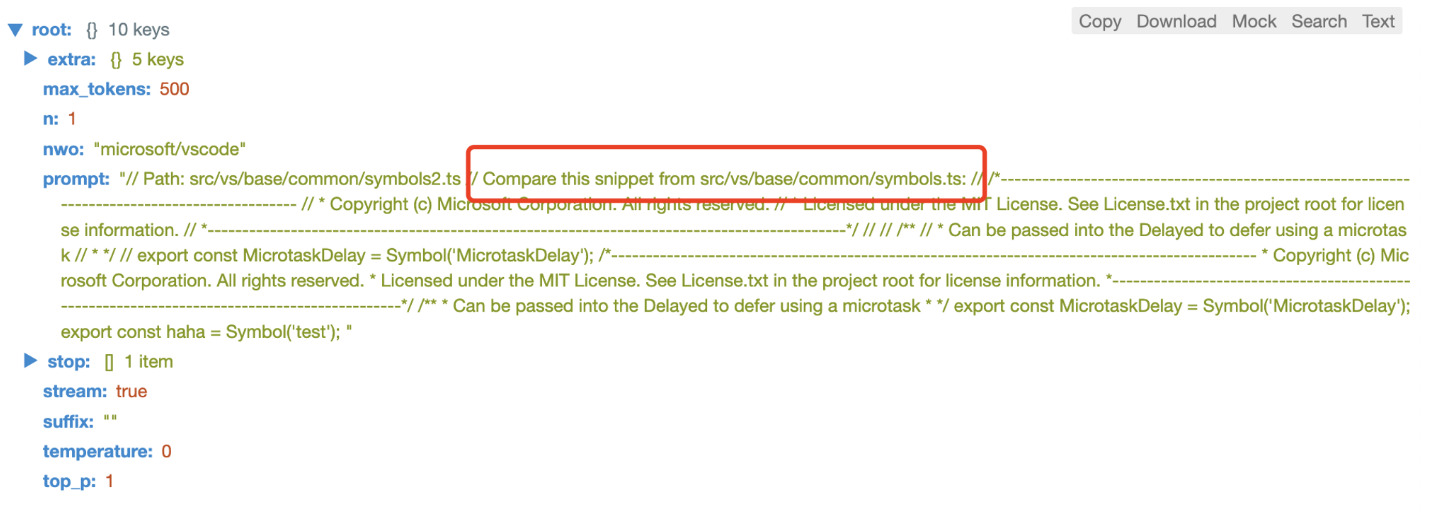
可以看到这里,相关文件的snippet会包裹在注释里,并在头部加上一行`Compare this …`的文案,提供给模型。
- beforeCursor
beforeCursor的代码比较简单:
```jsx
promptWishlist.appendLineForLine(source.substring(0, offset), p.PromptElementKind.BeforeCursor, beforeCursorPriority).forEach((e) =>
      V.push(e)
    );
```

注意这里用了appendLineForLine,而不是append,让我们看一下appendLineForLine的实现:

```jsx
appendLineForLine(text, kind, priority) {
    const lineArr = (lines = this.convertLineEndings(text)).split("\n");
    for (let i = 0; i < lineArr.length - 1; i++) lineArr[i] += "\n";
    const lines = [];
    lineArr.forEach((line) => {
      if ("\n" === line && lines.length > 0 && !lines[lines.length - 1].endsWith("\n\n")) {
        lines[lines.length - 1] += "\n";
      } else {
        lines.push(line);
      }
    });
    const result = [];
    lines.forEach((text, index) => {
      if ("" !== text) {
        result.push(this.append(text, kind, priority));
        if (index > 0) {
          this.content[this.content.length - 2].requires = [
            this.content[this.content.length - 1],
          ];
        }
      }
    });
    return result;
  }
```

实际上这段代码的作用就是将光标前的内容按行append,这样在token有限的情况下,能够按行保留最大的上下文。
wishList 的 fullfill 整合处理
接下来是一系列依赖关系的处理:
if (h.Top === promptOpts.languageMarker && V.length > 0 && void 0 !== languageMarkerId) {
    promptWishlist.require(languageMarkerId, V[0]);
  }
  if (f.Top === promptOpts.pathMarker && V.length > 0 && void 0 !== pathMarkerId) {
    if (languageMarkerId) {
      promptWishlist.require(pathMarkerId, languageMarkerId);
    } else {
      promptWishlist.require(pathMarkerId, V[0]);
    }
  }
  if (void 0 !== languageMarkerId && void 0 !== pathMarkerId) {
    promptWishlist.exclude(pathMarkerId, languageMarkerId);
  }
这里有一点我不太理解:pathMarker 和 languageMarker 在这个逻辑中是互斥的。从我们之前的分析可以看出,pathMarker 的优先级高于 languageMarker,而这里的 exclude 操作意味着 languageMarker 永远不会出现。
最后,如果 suffixPercent 为 0,代码到这里就直接结束了,调用 fulfill 方法返回最终的结果:
if (0 === promptOpts.suffixPercent || q.length <= promptOpts.fimSuffixLengthThreshold)
    return promptWishlist.fulfill(promptOpts.maxPromptLength);
当然,根据我们之前的分析,suffixPercent 在当前版本中的默认值是 15,不为 0,因此会进入 suffix 的逻辑。
不过我们可以先看一下 fulfill 的处理流程,suffix 的逻辑暂且不表:
fulfill(maxPromptLength) {
    const promptChoices = new PromptChoices();
    const promptBackground = new PromptBackground();
    const elements = this.content.map((e, t) => ({
      element: e,
      index: t,
    }));
    elements.sort((e, t) =>
      e.element.priority === t.element.priority
        ? t.index - e.index
        : t.element.priority - e.element.priority
    );
    const requires = new Set();
    const excludes = new Set();
    let lastElement;
    const results = [];
    let promptLength = maxPromptLength;
    elements.forEach((e) => {
      const element = e.element;
      const index = e.index;
      if (
        promptLength >= 0 &&
        (promptLength > 0 || void 0 === lastElement) &&
        element.requires.every((e) => requires.has(e.id)) &&
        !excludes.has(r.id)
      ) {
        let tokens = element.tokens;
        const nextElement = (function (e, t) {
          let n;
          let r = 1 / 0;
          for (const i of e)
            if (i.index > t && i.index < r) {
              n = i;
              r = i.index;
            }
          return n;
        })(results, index)?.element;
        if (element.text.endsWith("\n\n") && nextElement && !nextElement.text.match(/^\s/)) {
          tokens++;
        }
        if (promptLength >= tokens) {
            promptLength -= tokens;
            requires.add(r.id);
          element.excludes.forEach((e) => excludes.add(e.id));
          promptChoices.markUsed(element);
          promptBackground.markUsed(element);
          results.push(e);
        } else {
          if (void 0 === lastElement) {
            lastElement = e;
          } else {
            promptChoices.markUnused(e.element);
            promptBackground.markUnused(e.element);
          }
        }
      } else {
        promptChoices.markUnused(element);
        promptBackground.markUnused(element);
      }
    });
    results.sort((e, t) => e.index - t.index);
    let prefix = results.reduce((e, t) => e + t.element.text, "");
    let prefixLength = this.tokenizer.tokenLength(prefix);
    for (; prefixLength > maxPromptLength; ) {
      u.sort((e, t) =>
        t.element.priority === e.element.priority
          ? t.index - e.index
          : t.element.priority - e.element.priority
      );
      const e = u.pop();
      if (e) {
        promptChoices.undoMarkUsed(e.element);
        promptChoices.markUnused(e.element);
        promptBackground.undoMarkUsed(e.element);
        promptBackground.markUnused(e.element);
        if (void 0 !== lastElement) {
          promptChoices.markUnused(lastElement.element);
          promptBackground.markUnused(lastElement.element);
        }
        lastElement = void 0;
      }
      u.sort((e, t) => e.index - t.index);
      prefix = u.reduce((e, t) => e + t.element.text, "");
      prefixLength = this.tokenizer.tokenLength(prefix);
    }
    const f = [...u];
    if (void 0 !== lastElement) {
      f.push(lastElement);
      f.sort((e, t) => e.index - t.index);
      const prefix = f.reduce((e, t) => e + t.element.text, "");
      const prefixLength = this.tokenizer.tokenLength(prefix);
      if (prefixLength <= maxPromptLength) {
        promptChoices.markUsed(l.element);
        promptBackground.markUsed(l.element);
        const promptElementRanges = new PromptElementRanges(f);
        return {
          prefix: prefix,
          suffix: "",
          prefixLength: prefixLength,
          suffixLength: 0,
          promptChoices: promptChoices,
          promptBackground: promptBackground,
          promptElementRanges: promptElementRanges,
        };
      }
      promptChoices.markUnused(l.element);
      promptBackground.markUnused(l.element);
    }
    const m = new PromptElementRanges(u);
    return {
      prefix: prefix,
      suffix: "",
      prefixLength: prefixLength,
      suffixLength: 0,
      promptChoices: promptChoices,
      promptBackground: promptBackground,
      promptElementRanges: m,
    };
  }
这个 fulfill 逻辑的核心有两点:
- 首先按照 Priority 排序(Priority 相同按 index),处理文本内容。这意味着,在 Token 数量有限的情况下,Priority 越高的文本越能被优先保留。
- 输出时,文本按照插入 wishList 的先后顺序排序。也就是说,Priority 只用于决定文本的处理顺序,最终组合成的 prefix 文本顺序则取决于它们被加入 wishList 的时间顺序。
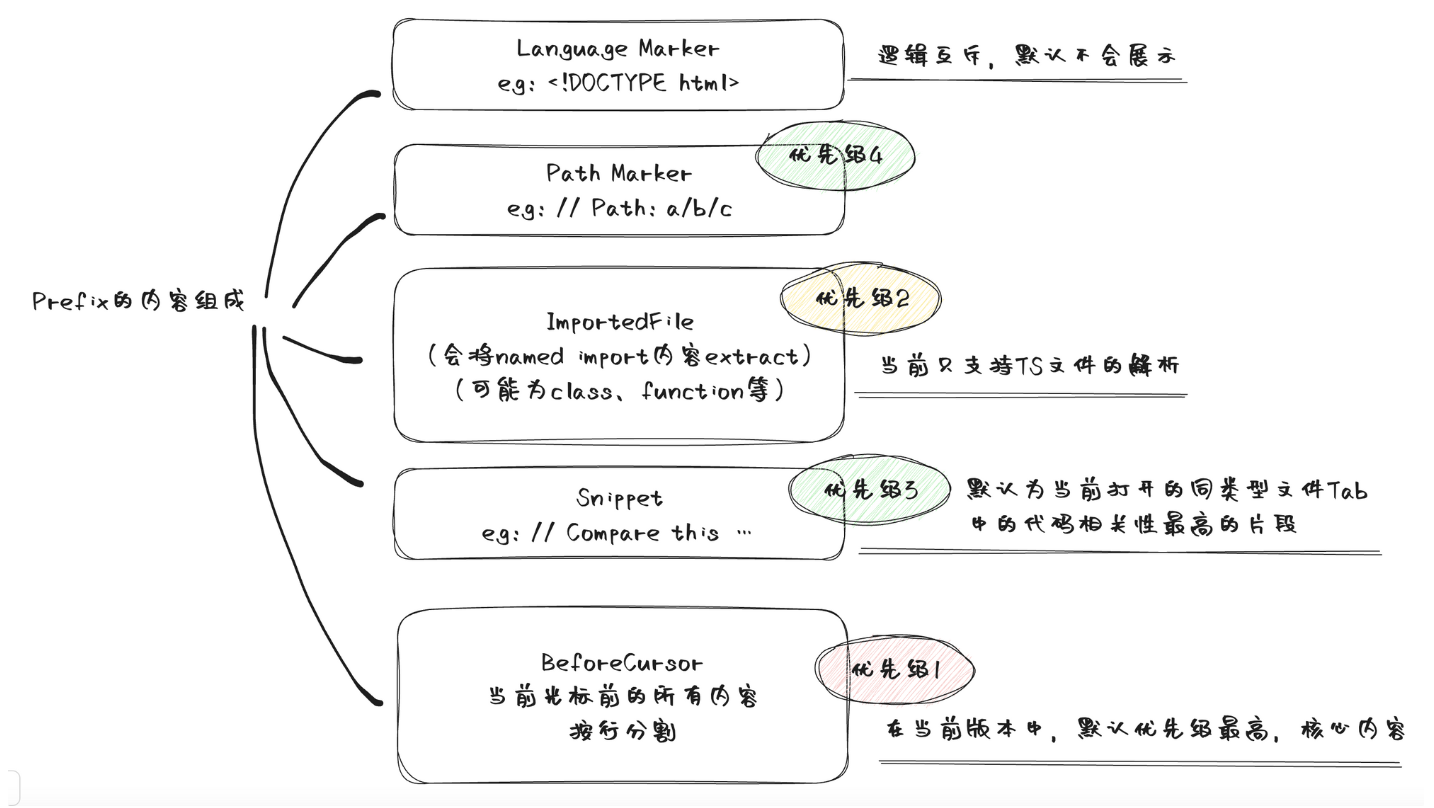
因此,结合前面的分析,我们可以得出文本的优先级顺序如下:
languageMarkerpathMarkerimportedFileSnippetbeforeCursor
而处理优先级则是:
beforeCursorimportedFileSnippetpathMarkerlanguageMarker
Prompt 组成的示意图
从代码上看,prompt 的结构比较复杂。为了总结一下 prefix 的组成,我们可以将其整体画出来:
抓包实验一下
我们找一个 TS 文件来试试:
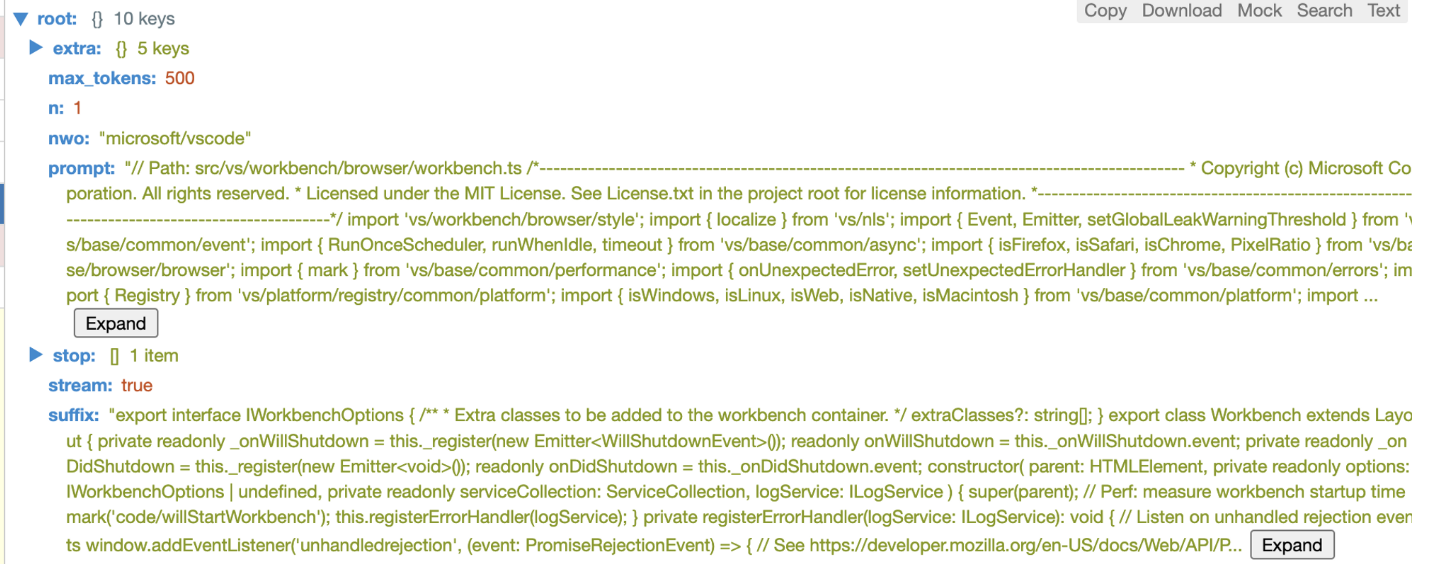
可以看到,在 Copilot 发起的请求中,prompt 包含了 Path Marker 和 BeforeCursor 两部分,这也是我们在使用过程中最常见的场景。
如果代码的相关性足够高,我们还会看到 snippet 的部分。比如我们复制了一个简单的文件:
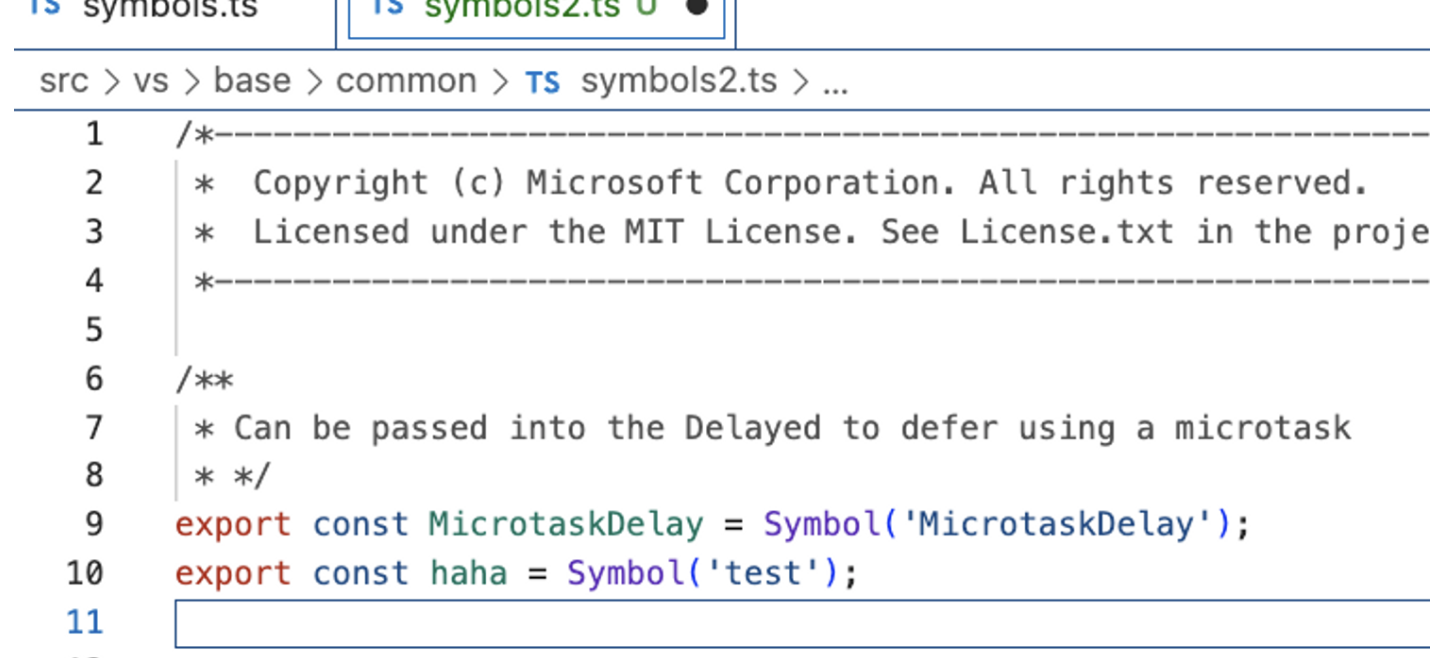
这时就会生成对应的 snippet:
小结
通过分析 Copilot,我们可以学到几个核心思想:
- 对编辑器输入的各种边界情况进行了全面考虑,包括输入过少、过多、取消等众多场景。
- 运用了缓存思想,通过多级缓存策略保护后端服务,因为模型运算本身成本很高。
- prompt 的设计不仅包含了上下文代码,还在文件解析和编辑器打开的相关代码上做了很多优化。
- 利用简单的 Jaccard 算法计算分词后的文本相似度,从而快速决策出与当前上下文相关的 snippet。
- 实验驱动的设计理念:Copilot 中的大量参数、优先级和设置字段都是通过实验来调整的,并且有一套完整的监控上报体系,帮助团队不断优化这些参数以达到更好的效果。
总的来说,Copilot 的逻辑比我想象的要复杂得多,逆向分析的难度也更高。我在解析这部分代码上花费了大量时间。本文中提到的工具链和相关代码都已经上传到 GitHub,希望能对有需要的同学有所帮助:
相似工具推荐
everything-claude-code
everything-claude-code 是一套专为 AI 编程助手(如 Claude Code、Codex、Cursor 等)打造的高性能优化系统。它不仅仅是一组配置文件,而是一个经过长期实战打磨的完整框架,旨在解决 AI 代理在实际开发中面临的效率低下、记忆丢失、安全隐患及缺乏持续学习能力等核心痛点。 通过引入技能模块化、直觉增强、记忆持久化机制以及内置的安全扫描功能,everything-claude-code 能显著提升 AI 在复杂任务中的表现,帮助开发者构建更稳定、更智能的生产级 AI 代理。其独特的“研究优先”开发理念和针对 Token 消耗的优化策略,使得模型响应更快、成本更低,同时有效防御潜在的攻击向量。 这套工具特别适合软件开发者、AI 研究人员以及希望深度定制 AI 工作流的技术团队使用。无论您是在构建大型代码库,还是需要 AI 协助进行安全审计与自动化测试,everything-claude-code 都能提供强大的底层支持。作为一个曾荣获 Anthropic 黑客大奖的开源项目,它融合了多语言支持与丰富的实战钩子(hooks),让 AI 真正成长为懂上
gemini-cli
gemini-cli 是一款由谷歌推出的开源 AI 命令行工具,它将强大的 Gemini 大模型能力直接集成到用户的终端环境中。对于习惯在命令行工作的开发者而言,它提供了一条从输入提示词到获取模型响应的最短路径,无需切换窗口即可享受智能辅助。 这款工具主要解决了开发过程中频繁上下文切换的痛点,让用户能在熟悉的终端界面内直接完成代码理解、生成、调试以及自动化运维任务。无论是查询大型代码库、根据草图生成应用,还是执行复杂的 Git 操作,gemini-cli 都能通过自然语言指令高效处理。 它特别适合广大软件工程师、DevOps 人员及技术研究人员使用。其核心亮点包括支持高达 100 万 token 的超长上下文窗口,具备出色的逻辑推理能力;内置 Google 搜索、文件操作及 Shell 命令执行等实用工具;更独特的是,它支持 MCP(模型上下文协议),允许用户灵活扩展自定义集成,连接如图像生成等外部能力。此外,个人谷歌账号即可享受免费的额度支持,且项目基于 Apache 2.0 协议完全开源,是提升终端工作效率的理想助手。
markitdown
MarkItDown 是一款由微软 AutoGen 团队打造的轻量级 Python 工具,专为将各类文件高效转换为 Markdown 格式而设计。它支持 PDF、Word、Excel、PPT、图片(含 OCR)、音频(含语音转录)、HTML 乃至 YouTube 链接等多种格式的解析,能够精准提取文档中的标题、列表、表格和链接等关键结构信息。 在人工智能应用日益普及的今天,大语言模型(LLM)虽擅长处理文本,却难以直接读取复杂的二进制办公文档。MarkItDown 恰好解决了这一痛点,它将非结构化或半结构化的文件转化为模型“原生理解”且 Token 效率极高的 Markdown 格式,成为连接本地文件与 AI 分析 pipeline 的理想桥梁。此外,它还提供了 MCP(模型上下文协议)服务器,可无缝集成到 Claude Desktop 等 LLM 应用中。 这款工具特别适合开发者、数据科学家及 AI 研究人员使用,尤其是那些需要构建文档检索增强生成(RAG)系统、进行批量文本分析或希望让 AI 助手直接“阅读”本地文件的用户。虽然生成的内容也具备一定可读性,但其核心优势在于为机器
LLMs-from-scratch
LLMs-from-scratch 是一个基于 PyTorch 的开源教育项目,旨在引导用户从零开始一步步构建一个类似 ChatGPT 的大型语言模型(LLM)。它不仅是同名技术著作的官方代码库,更提供了一套完整的实践方案,涵盖模型开发、预训练及微调的全过程。 该项目主要解决了大模型领域“黑盒化”的学习痛点。许多开发者虽能调用现成模型,却难以深入理解其内部架构与训练机制。通过亲手编写每一行核心代码,用户能够透彻掌握 Transformer 架构、注意力机制等关键原理,从而真正理解大模型是如何“思考”的。此外,项目还包含了加载大型预训练权重进行微调的代码,帮助用户将理论知识延伸至实际应用。 LLMs-from-scratch 特别适合希望深入底层原理的 AI 开发者、研究人员以及计算机专业的学生。对于不满足于仅使用 API,而是渴望探究模型构建细节的技术人员而言,这是极佳的学习资源。其独特的技术亮点在于“循序渐进”的教学设计:将复杂的系统工程拆解为清晰的步骤,配合详细的图表与示例,让构建一个虽小但功能完备的大模型变得触手可及。无论你是想夯实理论基础,还是为未来研发更大规模的模型做准备
NextChat
NextChat 是一款轻量且极速的 AI 助手,旨在为用户提供流畅、跨平台的大模型交互体验。它完美解决了用户在多设备间切换时难以保持对话连续性,以及面对众多 AI 模型不知如何统一管理的痛点。无论是日常办公、学习辅助还是创意激发,NextChat 都能让用户随时随地通过网页、iOS、Android、Windows、MacOS 或 Linux 端无缝接入智能服务。 这款工具非常适合普通用户、学生、职场人士以及需要私有化部署的企业团队使用。对于开发者而言,它也提供了便捷的自托管方案,支持一键部署到 Vercel 或 Zeabur 等平台。 NextChat 的核心亮点在于其广泛的模型兼容性,原生支持 Claude、DeepSeek、GPT-4 及 Gemini Pro 等主流大模型,让用户在一个界面即可自由切换不同 AI 能力。此外,它还率先支持 MCP(Model Context Protocol)协议,增强了上下文处理能力。针对企业用户,NextChat 提供专业版解决方案,具备品牌定制、细粒度权限控制、内部知识库整合及安全审计等功能,满足公司对数据隐私和个性化管理的高标准要求。
ML-For-Beginners
ML-For-Beginners 是由微软推出的一套系统化机器学习入门课程,旨在帮助零基础用户轻松掌握经典机器学习知识。这套课程将学习路径规划为 12 周,包含 26 节精炼课程和 52 道配套测验,内容涵盖从基础概念到实际应用的完整流程,有效解决了初学者面对庞大知识体系时无从下手、缺乏结构化指导的痛点。 无论是希望转型的开发者、需要补充算法背景的研究人员,还是对人工智能充满好奇的普通爱好者,都能从中受益。课程不仅提供了清晰的理论讲解,还强调动手实践,让用户在循序渐进中建立扎实的技能基础。其独特的亮点在于强大的多语言支持,通过自动化机制提供了包括简体中文在内的 50 多种语言版本,极大地降低了全球不同背景用户的学习门槛。此外,项目采用开源协作模式,社区活跃且内容持续更新,确保学习者能获取前沿且准确的技术资讯。如果你正寻找一条清晰、友好且专业的机器学习入门之路,ML-For-Beginners 将是理想的起点。