scikit-opt
scikit-opt 是一款基于 Python 的开源智能优化算法库,旨在为复杂问题的求解提供高效的计算方案。它集成了遗传算法、粒子群优化、模拟退火、蚁群算法、免疫算法及差分进化等多种经典群体智能策略,特别擅长处理非线性函数优化与组合优化难题,如旅行商路径规划等场景。
面对传统方法难以收敛或效率低下的优化挑战,scikit-opt 通过成熟的算法封装降低了使用门槛。它非常适合算法工程师、数据科学家以及高校研究人员在机器学习调参、工程调度或科研建模中使用。
其独特的技术亮点在于对自定义算子(UDF)的支持。开发者可以灵活定义选择、交叉、变异等核心操作逻辑,从而针对特定问题定制专属算法流程。配合简洁的 pip 安装命令和多平台兼容性,scikit-opt 让智能优化算法的落地变得既专业又便捷,是 Python 生态中值得信赖的优化工具库。
使用场景
某电商物流公司的算法团队正在解决每日数百个网点的配送路径规划难题,目标是最小化总行驶里程并满足严格的时效要求。
没有 scikit-opt 时
- 需从零实现遗传算法核心逻辑,包括编码、交叉和变异操作,开发周期长达两周。
- 调试过程繁琐,难以平衡种群多样性与收敛速度,常陷入局部最优解而无法突破。
- 面对载重限制和时间窗等多重约束,手动编写过滤逻辑容易引入隐蔽的 Bug。
- 不同项目间算法复用率低,每次调整策略都要重新修改底层代码,维护成本高昂。
使用 scikit-opt 后
- 利用
scikit-opt内置的 GA_TSP 类,仅需定义目标函数即可快速启动优化流程。 - 通过 register 方法自定义选择算子,轻松应对复杂的业务约束条件而不破坏框架。
- 内置多种智能算法可选,无需反复调参即可找到接近全局最优的路径方案。
- 代码结构清晰,后续维护和新需求扩展变得异常简单,大幅降低人力投入与试错成本。
scikit-opt 将复杂的组合优化问题转化为标准接口调用,显著提升了算法落地效率。
运行环境要求
- Windows
- Linux
- macOS
未说明
未说明

快速开始
scikit-opt








Python 中的群体智能
(遗传算法、粒子群优化、模拟退火、蚁群算法、免疫算法、人工鱼群算法)
- 文档: https://scikit-opt.github.io/scikit-opt/#/en/
- 文档: https://scikit-opt.github.io/scikit-opt/#/zh/
- 源代码: https://github.com/guofei9987/scikit-opt
- 帮助我们改进 scikit-opt https://www.wjx.cn/jq/50964691.aspx
安装
pip install scikit-opt
对于当前的开发版本:
git clone git@github.com:guofei9987/scikit-opt.git
cd scikit-opt
pip install .
功能特性
功能一:UDF(用户自定义函数)
UDF(用户自定义函数,User Defined Function)现已可用!
例如,你刚刚设计了一种新的 selection(选择)函数。
现在,你的 selection 函数如下所示:
-> 演示代码:examples/demo_ga_udf.py#s1
# step1: define your own operator:
def selection_tournament(algorithm, tourn_size):
    FitV = algorithm.FitV
    sel_index = []
    for i in range(algorithm.size_pop):
        aspirants_index = np.random.choice(range(algorithm.size_pop), size=tourn_size)
        sel_index.append(max(aspirants_index, key=lambda i: FitV[i]))
    algorithm.Chrom = algorithm.Chrom[sel_index, :]  # next generation
    return algorithm.Chrom
导入并构建 GA(遗传算法)
-> 演示代码:examples/demo_ga_udf.py#s2
import numpy as np
from sko.GA import GA, GA_TSP

demo_func = lambda x: x[0] ** 2 + (x[1] - 0.05) ** 2 + (x[2] - 0.5) ** 2
ga = GA(func=demo_func, n_dim=3, size_pop=100, max_iter=500, prob_mut=0.001,
        lb=[-1, -10, -5], ub=[2, 10, 2], precision=[1e-7, 1e-7, 1])
将你的 UDF 注册到 GA
-> 演示代码:examples/demo_ga_udf.py#s3
ga.register(operator_name='selection', operator=selection_tournament, tourn_size=3)
scikit-opt 还提供了一些算子
-> 演示代码:examples/demo_ga_udf.py#s4
from sko.operators import ranking, selection, crossover, mutation

ga.register(operator_name='ranking', operator=ranking.ranking). \
    register(operator_name='crossover', operator=crossover.crossover_2point). \
    register(operator_name='mutation', operator=mutation.mutation)
现在像往常一样运行 GA
-> 演示代码:examples/demo_ga_udf.py#s5
best_x, best_y = ga.run()
print('best_x:', best_x, '\n', 'best_y:', best_y)
截至目前,udf 支持 GA 的
crossover(交叉)、mutation(变异)、selection(选择)、ranking(排序) scikit-opt 提供了一打以上的算子,详见 此处
针对高级用户:
-> 演示代码:examples/demo_ga_udf.py#s6
class MyGA(GA):
    def selection(self, tourn_size=3):
        FitV = self.FitV
        sel_index = []
        for i in range(self.size_pop):
            aspirants_index = np.random.choice(range(self.size_pop), size=tourn_size)
            sel_index.append(max(aspirants_index, key=lambda i: FitV[i]))
        self.Chrom = self.Chrom[sel_index, :]  # next generation
        return self.Chrom

    ranking = ranking.ranking


demo_func = lambda x: x[0] ** 2 + (x[1] - 0.05) ** 2 + (x[2] - 0.5) ** 2
my_ga = MyGA(func=demo_func, n_dim=3, size_pop=100, max_iter=500, lb=[-1, -10, -5], ub=[2, 10, 2],
             precision=[1e-7, 1e-7, 1])
best_x, best_y = my_ga.run()
print('best_x:', best_x, '\n', 'best_y:', best_y)
功能二:继续运行
(v0.3.6 新增)
先运行算法 10 次迭代,然后基于之前的 10 次迭代再运行另外 20 次迭代:
from sko.GA import GA

func = lambda x: x[0] ** 2
ga = GA(func=func, n_dim=1)
ga.run(10)
ga.run(20)
功能三:4 种加速方式
- vectorization(向量化)
- multithreading(多线程)
- multiprocessing(多进程)
- cached(缓存)
参见 https://github.com/guofei9987/scikit-opt/blob/master/examples/example_function_modes.py
功能四:GPU 计算
我们正在开发 GPU 计算功能,该功能将在 1.0.0 版本中稳定。
示例已可用:https://github.com/guofei9987/scikit-opt/blob/master/examples/demo_ga_gpu.py
快速开始
1. 差分进化算法 (Differential Evolution)
步骤 1:定义你的问题
-> 示例代码:examples/demo_de.py#s1
'''
min f(x1, x2, x3) = x1^2 + x2^2 + x3^2
s.t.
    x1*x2 >= 1
    x1*x2 <= 5
    x2 + x3 = 1
    0 <= x1, x2, x3 <= 5
'''


def obj_func(p):
    x1, x2, x3 = p
    return x1 ** 2 + x2 ** 2 + x3 ** 2


constraint_eq = [
    lambda x: 1 - x[1] - x[2]
]

constraint_ueq = [
    lambda x: 1 - x[0] * x[1],
    lambda x: x[0] * x[1] - 5
]
步骤 2:执行差分进化算法
-> 示例代码:examples/demo_de.py#s2
from sko.DE import DE

de = DE(func=obj_func, n_dim=3, size_pop=50, max_iter=800, lb=[0, 0, 0], ub=[5, 5, 5],
        constraint_eq=constraint_eq, constraint_ueq=constraint_ueq)

best_x, best_y = de.run()
print('best_x:', best_x, '\n', 'best_y:', best_y)
2. 遗传算法 (Genetic Algorithm)
步骤 1:定义你的问题
-> 示例代码:examples/demo_ga.py#s1
import numpy as np


def schaffer(p):
    '''
    This function has plenty of local minimum, with strong shocks
    global minimum at (0,0) with value 0
    https://en.wikipedia.org/wiki/Test_functions_for_optimization
    '''
    x1, x2 = p
    part1 = np.square(x1) - np.square(x2)
    part2 = np.square(x1) + np.square(x2)
    return 0.5 + (np.square(np.sin(part1)) - 0.5) / np.square(1 + 0.001 * part2)
步骤 2:执行遗传算法
-> 示例代码:examples/demo_ga.py#s2
from sko.GA import GA

ga = GA(func=schaffer, n_dim=2, size_pop=50, max_iter=800, prob_mut=0.001, lb=[-1, -1], ub=[1, 1], precision=1e-7)
best_x, best_y = ga.run()
print('best_x:', best_x, '\n', 'best_y:', best_y)
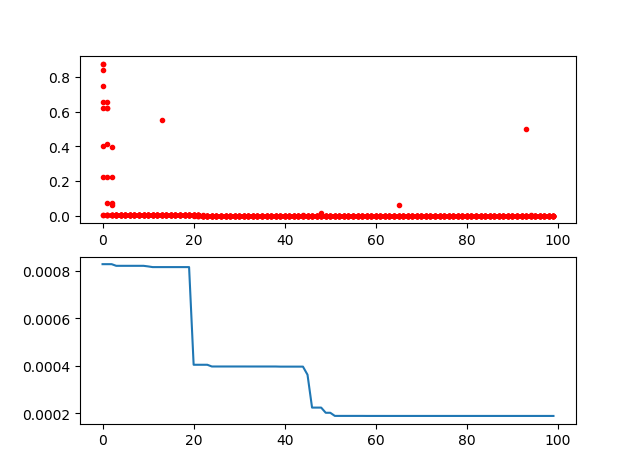
-> 示例代码:examples/demo_ga.py#s3
import pandas as pd
import matplotlib.pyplot as plt

Y_history = pd.DataFrame(ga.all_history_Y)
fig, ax = plt.subplots(2, 1)
ax[0].plot(Y_history.index, Y_history.values, '.', color='red')
Y_history.min(axis=1).cummin().plot(kind='line')
plt.show()
2.2 用于旅行商问题 (Travelling Salesman Problem) 的遗传算法
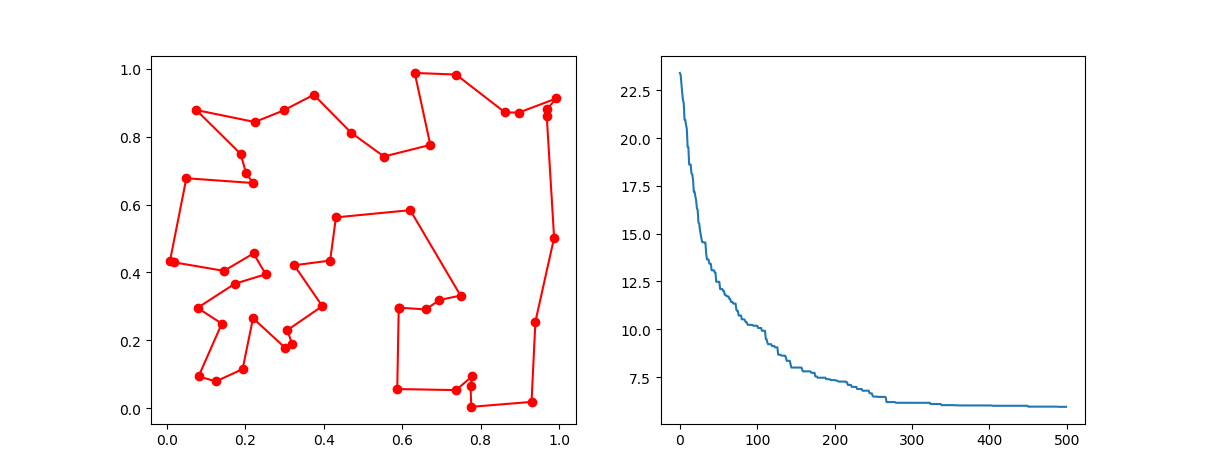
只需导入 GA_TSP,它重载了 crossover(交叉)、mutation(变异)以解决 TSP 问题。
步骤 1:定义你的问题。准备点的坐标和距离矩阵。
这里我随机生成数据作为演示:
-> 示例代码:examples/demo_ga_tsp.py#s1
import numpy as np
from scipy import spatial
import matplotlib.pyplot as plt

num_points = 50

points_coordinate = np.random.rand(num_points, 2)  # generate coordinate of points
distance_matrix = spatial.distance.cdist(points_coordinate, points_coordinate, metric='euclidean')


def cal_total_distance(routine):
    '''The objective function. input routine, return total distance.
    cal_total_distance(np.arange(num_points))
    '''
    num_points, = routine.shape
    return sum([distance_matrix[routine[i % num_points], routine[(i + 1) % num_points]] for i in range(num_points)])
步骤 2:执行遗传算法
-> 示例代码:examples/demo_ga_tsp.py#s2
from sko.GA import GA_TSP

ga_tsp = GA_TSP(func=cal_total_distance, n_dim=num_points, size_pop=50, max_iter=500, prob_mut=1)
best_points, best_distance = ga_tsp.run()
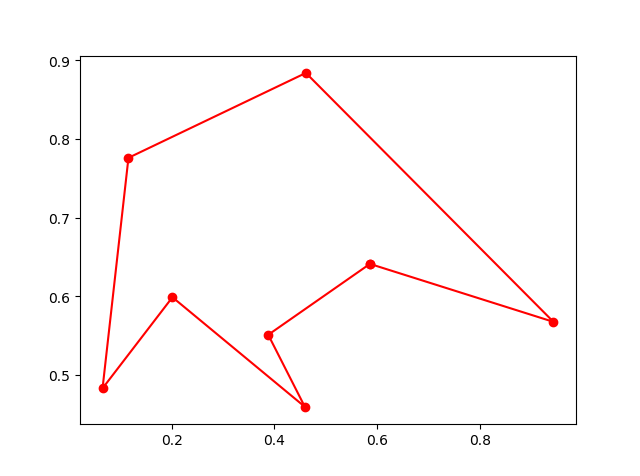
步骤 3:绘制结果:
-> 示例代码:examples/demo_ga_tsp.py#s3
fig, ax = plt.subplots(1, 2)
best_points_ = np.concatenate([best_points, [best_points[0]]])
best_points_coordinate = points_coordinate[best_points_, :]
ax[0].plot(best_points_coordinate[:, 0], best_points_coordinate[:, 1], 'o-r')
ax[1].plot(ga_tsp.generation_best_Y)
plt.show()
3. PSO(粒子群优化算法)
3.1 PSO
步骤 1:定义你的问题:
-> 示例代码:examples/demo_pso.py#s1
def demo_func(x):
    x1, x2, x3 = x
    return x1 ** 2 + (x2 - 0.05) ** 2 + x3 ** 2
步骤 2:执行 PSO
-> 示例代码:examples/demo_pso.py#s2
from sko.PSO import PSO

pso = PSO(func=demo_func, n_dim=3, pop=40, max_iter=150, lb=[0, -1, 0.5], ub=[1, 1, 1], w=0.8, c1=0.5, c2=0.5)
pso.run()
print('best_x is ', pso.gbest_x, 'best_y is', pso.gbest_y)
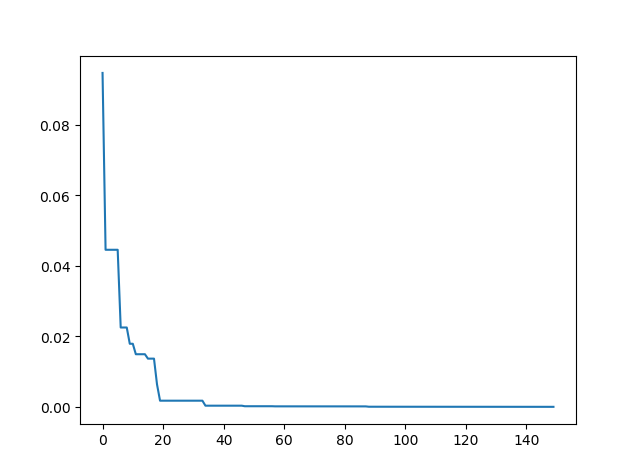
步骤 3:绘制结果
-> 示例代码:examples/demo_pso.py#s3
import matplotlib.pyplot as plt

plt.plot(pso.gbest_y_hist)
plt.show()
3.2 带非线性约束的 PSO
如果你需要非线性约束,例如 (x[0] - 1) ** 2 + (x[1] - 0) ** 2 - 0.5 ** 2<=0
代码如下:
constraint_ueq = (
    lambda x: (x[0] - 1) ** 2 + (x[1] - 0) ** 2 - 0.5 ** 2
    ,
)
pso = PSO(func=demo_func, n_dim=2, pop=40, max_iter=max_iter, lb=[-2, -2], ub=[2, 2]
          , constraint_ueq=constraint_ueq)
注意,你可以添加多个非线性约束。只需将它们添加到 constraint_ueq 中。
此外,我们还提供了一个动画: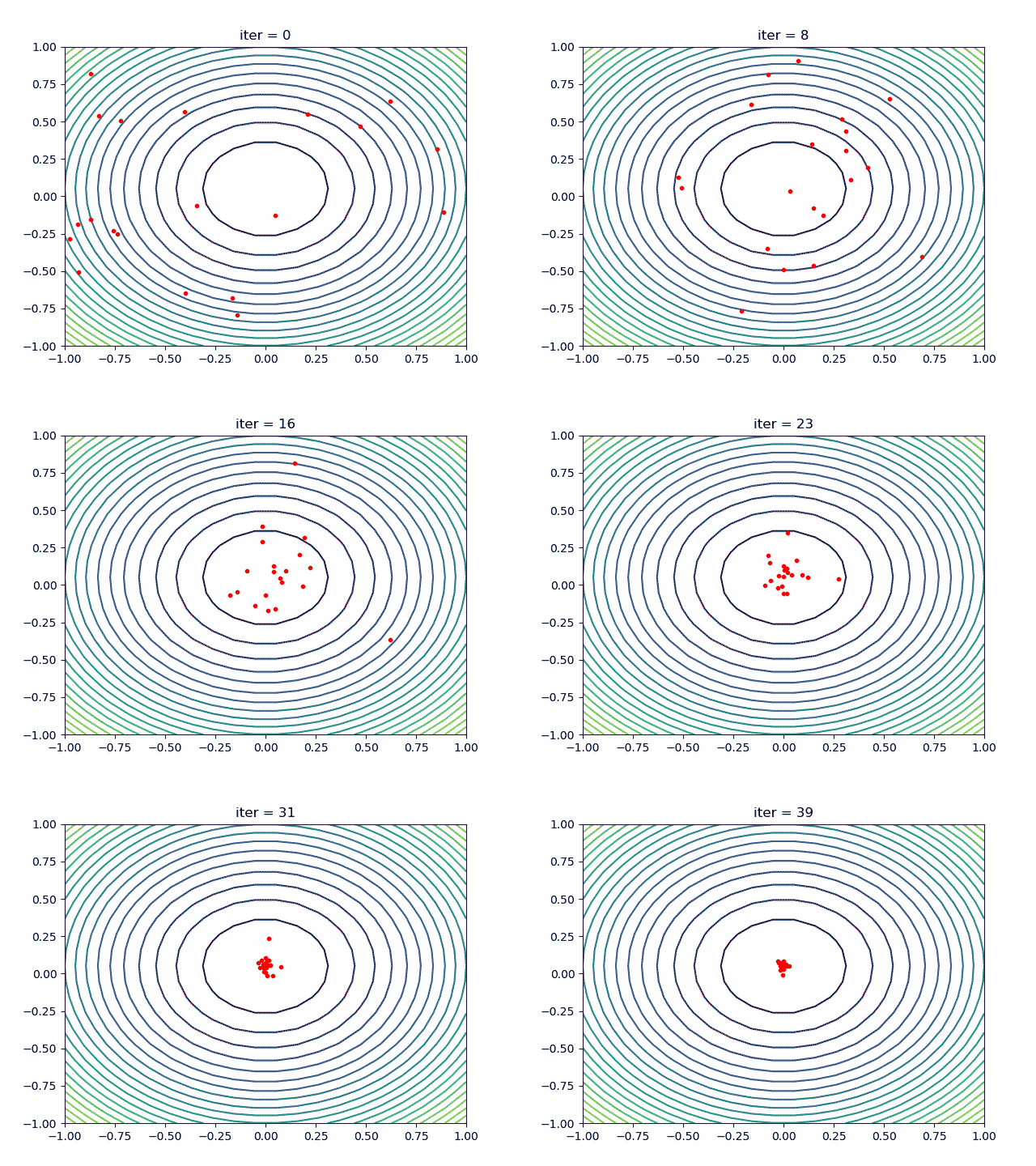
↑查看 examples/demo_pso_ani.py
4. SA(模拟退火算法)
4.1 多变量函数模拟退火 (SA)
步骤 1:定义你的问题
-> Demo code: examples/demo_sa.py#s1
demo_func = lambda x: x[0] ** 2 + (x[1] - 0.05) ** 2 + x[2] ** 2
步骤 2:执行模拟退火 (SA)
-> Demo code: examples/demo_sa.py#s2
from sko.SA import SA

sa = SA(func=demo_func, x0=[1, 1, 1], T_max=1, T_min=1e-9, L=300, max_stay_counter=150)
best_x, best_y = sa.run()
print('best_x:', best_x, 'best_y', best_y)
步骤 3:绘制结果
-> Demo code: examples/demo_sa.py#s3
import matplotlib.pyplot as plt
import pandas as pd

plt.plot(pd.DataFrame(sa.best_y_history).cummin(axis=0))
plt.show()
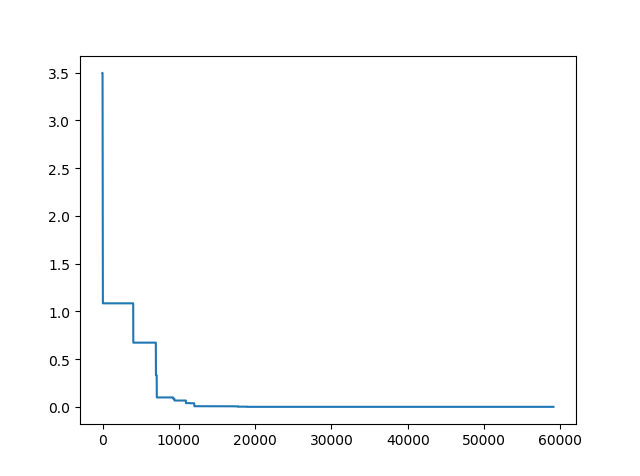
此外,scikit-opt 提供三种类型的模拟退火算法:Fast、Boltzmann、Cauchy。详见 更多 SA
4.2 旅行商问题 (TSP) 的模拟退火 (SA)
步骤 1:哦,是的,定义你的问题。这一步太无聊了,就不复制了。
步骤 2:为 TSP 执行 SA
-> Demo code: examples/demo_sa_tsp.py#s2
from sko.SA import SA_TSP

sa_tsp = SA_TSP(func=cal_total_distance, x0=range(num_points), T_max=100, T_min=1, L=10 * num_points)

best_points, best_distance = sa_tsp.run()
print(best_points, best_distance, cal_total_distance(best_points))
步骤 3:绘制结果
-> Demo code: examples/demo_sa_tsp.py#s3
from matplotlib.ticker import FormatStrFormatter

fig, ax = plt.subplots(1, 2)

best_points_ = np.concatenate([best_points, [best_points[0]]])
best_points_coordinate = points_coordinate[best_points_, :]
ax[0].plot(sa_tsp.best_y_history)
ax[0].set_xlabel("Iteration")
ax[0].set_ylabel("Distance")
ax[1].plot(best_points_coordinate[:, 0], best_points_coordinate[:, 1],
           marker='o', markerfacecolor='b', color='c', linestyle='-')
ax[1].xaxis.set_major_formatter(FormatStrFormatter('%.3f'))
ax[1].yaxis.set_major_formatter(FormatStrFormatter('%.3f'))
ax[1].set_xlabel("Longitude")
ax[1].set_ylabel("Latitude")
plt.show()
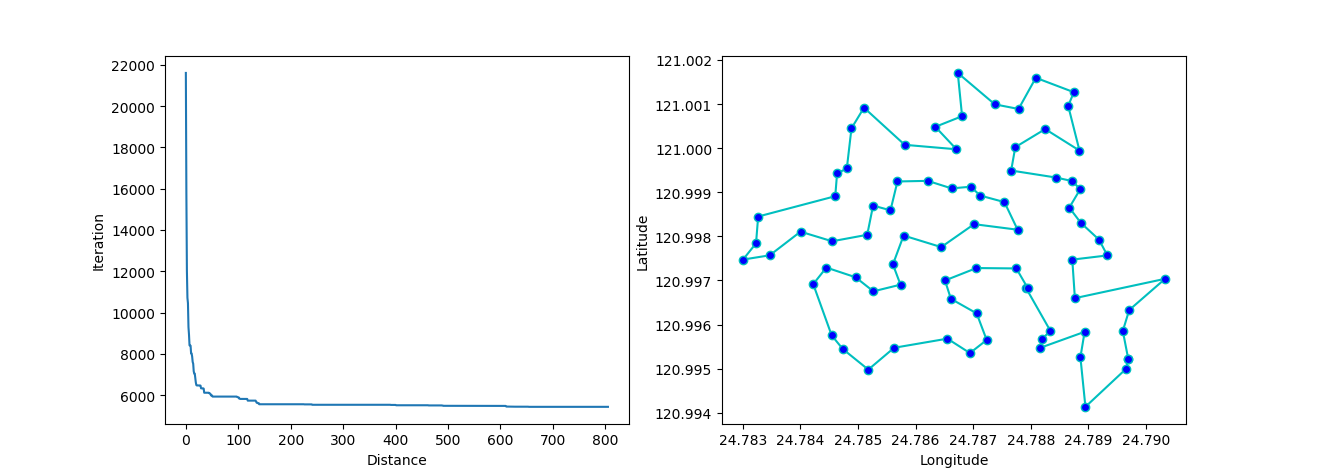
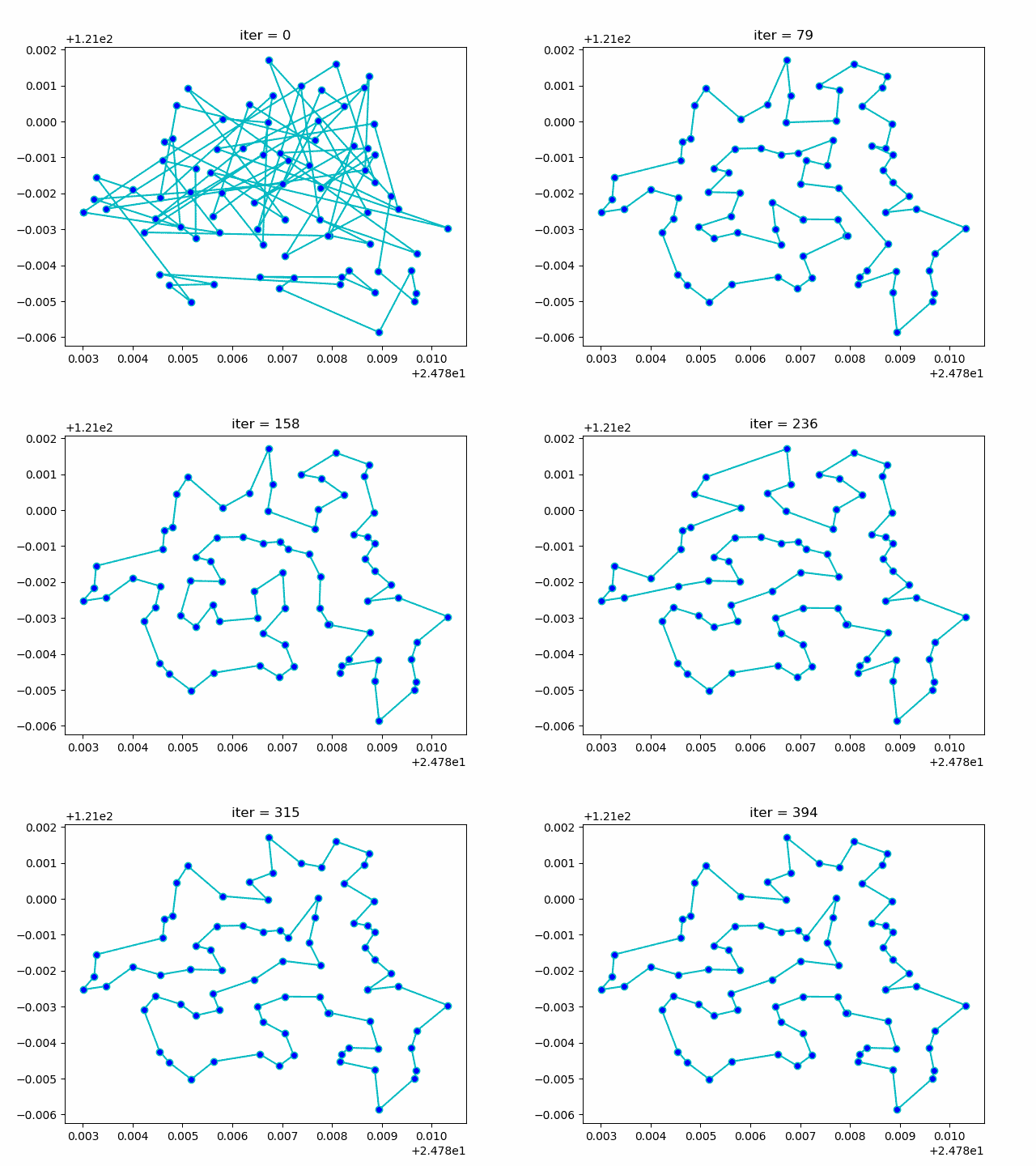
更多:绘制动画:
5. 旅行商问题 (TSP) 的蚁群算法 (ACA)
-> Demo code: examples/demo_aca_tsp.py#s2
from sko.ACA import ACA_TSP

aca = ACA_TSP(func=cal_total_distance, n_dim=num_points,
              size_pop=50, max_iter=200,
              distance_matrix=distance_matrix)

best_x, best_y = aca.run()
6. 免疫算法 (IA)
-> Demo code: examples/demo_ia.py#s2
from sko.IA import IA_TSP

ia_tsp = IA_TSP(func=cal_total_distance, n_dim=num_points, size_pop=500, max_iter=800, prob_mut=0.2,
                T=0.7, alpha=0.95)
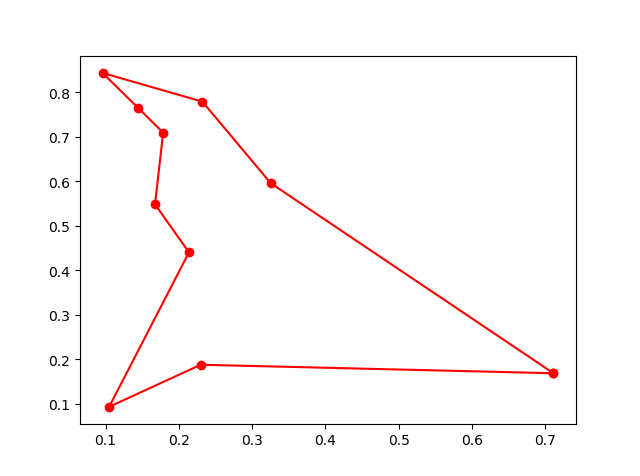
best_points, best_distance = ia_tsp.run()
print('best routine:', best_points, 'best_distance:', best_distance)
7. 人工鱼群算法 (AFSA)
-> Demo code: examples/demo_afsa.py#s1
def func(x):
    x1, x2 = x
    return 1 / x1 ** 2 + x1 ** 2 + 1 / x2 ** 2 + x2 ** 2


from sko.AFSA import AFSA

afsa = AFSA(func, n_dim=2, size_pop=50, max_iter=300,
            max_try_num=100, step=0.5, visual=0.3,
            q=0.98, delta=0.5)
best_x, best_y = afsa.run()
print(best_x, best_y)
使用 scikit-opt 的项目
- Yu, J., He, Y., Yan, Q., & Kang, X. (2021). SpecView: 基于奇异谱变换的恶意软件频谱可视化框架。IEEE Transactions on Information Forensics and Security, 16, 5093-5107.
- Zhen, H., Zhai, H., Ma, W., Zhao, L., Weng, Y., Xu, Y., ... & He, X. (2021). 基于强化学习 (Reinforcement-learning) 的潮流最优解生成器的设计与测试。Energy Reports.
- Heinrich, K., Zschech, P., Janiesch, C., & Bonin, M. (2021). 过程数据属性至关重要:引入门控卷积神经网络 (GCNN) 和键值预测注意力网络 (KVP) 以进行深度学习的下一个事件预测。Decision Support Systems, 143, 113494.
- Tang, H. K., & Goh, S. K. (2021). 一种受易经哲学启发的新型非种群元启发式优化器 (Meta-heuristic Optimizer)。arXiv preprint arXiv:2104.08564.
- Wu, G., Li, L., Li, X., Chen, Y., Chen, Z., Qiao, B., ... & Xia, L. (2021). 基于图嵌入 (Graph embedding) 的实时社交事件匹配用于 EBSNs 推荐。World Wide Web, 1-22.
- Pan, X., Zhang, Z., Zhang, H., Wen, Z., Ye, W., Yang, Y., ... & Zhao, X. (2021). 一种基于配备双损失函数的注意力机制 (Attention mechanism) 循环神经网络 (RNN) 的快速鲁棒混合气体识别与浓度检测算法。Sensors and Actuators B: Chemical, 342, 129982.
- Castella Balcell, M. (2021). WindCrete 浮动式海上风力涡轮机的系泊系统 (Station keeping system) 优化。
- Zhai, B., Wang, Y., Wang, W., & Wu, B. (2021). 雾况下高速公路路段的最优可变限速控制 (Variable Speed Limit Control) 策略。arXiv preprint arXiv:2107.14406.
- Yap, X. H. (2021). 局部线性数据上的多标签分类 (Multi-label classification):应用于化学毒性预测。
- Gebhard, L. (2021). 利用蚁群优化 (Ant Colony Optimization) 进行低压电网 (Low-Voltage Grids) 扩展规划 Ausbauplanung von Niederspannungsnetzen mithilfe eines Ameisenalgorithmus。
- Ma, X., Zhou, H., & Li, Z. (2021). 氢能与电力系统 (Power Systems) 之间相互依赖关系的优化设计。IEEE Transactions on Industry Applications.
- de Curso, T. D. C. (2021). Johansen-Ledoit-Sornette 金融泡沫 (Financial Bubbles) 模型研究。
- Wu, T., Liu, J., Liu, J., Huang, Z., Wu, H., Zhang, C., ... & Zhang, G. (2021). 一种基于人工智能 (AI) 的无人机 (UAV) 辅助无线传感器网络中年龄信息最优 (AoI) 轨迹规划新框架。IEEE Transactions on Wireless Communications.
- Liu, H., Wen, Z., & Cai, W. (2021, August). FastPSO:面向 GPU 上高效群体智能 (Swarm Intelligence) 算法。In 50th International Conference on Parallel Processing (pp. 1-10).
- Mahbub, R. (2020). 解决旅行商问题 (TSP) 的算法与优化技术。
- Li, J., Chen, T., Lim, K., Chen, L., Khan, S. A., Xie, J., & Wang, X. (2019). 深度学习 (Deep learning) 加速金纳米团簇合成。Advanced Intelligent Systems, 1(3), 1900029.
版本历史
v0.6.52021/06/28v0.6.32021/03/27v0.6.22021/03/13v0.6.12020/11/20v0.5.92020/08/29v0.5.82020/08/07v0.5.72020/06/08v0.5.62020/04/18v0.5.52020/01/31v0.5.42019/12/26v0.5.32019/12/23v0.5.22019/12/22v0.5.02019/12/02v0.3.52019/11/25v0.3.42019/11/21v0.3.32019/11/19v0.3.22019/10/25v0.3.12019/09/17v0.2.12019/09/07v0.1.12019/09/06常见问题
相似工具推荐
stable-diffusion-webui
stable-diffusion-webui 是一个基于 Gradio 构建的网页版操作界面,旨在让用户能够轻松地在本地运行和使用强大的 Stable Diffusion 图像生成模型。它解决了原始模型依赖命令行、操作门槛高且功能分散的痛点,将复杂的 AI 绘图流程整合进一个直观易用的图形化平台。 无论是希望快速上手的普通创作者、需要精细控制画面细节的设计师,还是想要深入探索模型潜力的开发者与研究人员,都能从中获益。其核心亮点在于极高的功能丰富度:不仅支持文生图、图生图、局部重绘(Inpainting)和外绘(Outpainting)等基础模式,还独创了注意力机制调整、提示词矩阵、负向提示词以及“高清修复”等高级功能。此外,它内置了 GFPGAN 和 CodeFormer 等人脸修复工具,支持多种神经网络放大算法,并允许用户通过插件系统无限扩展能力。即使是显存有限的设备,stable-diffusion-webui 也提供了相应的优化选项,让高质量的 AI 艺术创作变得触手可及。
everything-claude-code
everything-claude-code 是一套专为 AI 编程助手(如 Claude Code、Codex、Cursor 等)打造的高性能优化系统。它不仅仅是一组配置文件,而是一个经过长期实战打磨的完整框架,旨在解决 AI 代理在实际开发中面临的效率低下、记忆丢失、安全隐患及缺乏持续学习能力等核心痛点。 通过引入技能模块化、直觉增强、记忆持久化机制以及内置的安全扫描功能,everything-claude-code 能显著提升 AI 在复杂任务中的表现,帮助开发者构建更稳定、更智能的生产级 AI 代理。其独特的“研究优先”开发理念和针对 Token 消耗的优化策略,使得模型响应更快、成本更低,同时有效防御潜在的攻击向量。 这套工具特别适合软件开发者、AI 研究人员以及希望深度定制 AI 工作流的技术团队使用。无论您是在构建大型代码库,还是需要 AI 协助进行安全审计与自动化测试,everything-claude-code 都能提供强大的底层支持。作为一个曾荣获 Anthropic 黑客大奖的开源项目,它融合了多语言支持与丰富的实战钩子(hooks),让 AI 真正成长为懂上
ComfyUI
ComfyUI 是一款功能强大且高度模块化的视觉 AI 引擎,专为设计和执行复杂的 Stable Diffusion 图像生成流程而打造。它摒弃了传统的代码编写模式,采用直观的节点式流程图界面,让用户通过连接不同的功能模块即可构建个性化的生成管线。 这一设计巧妙解决了高级 AI 绘图工作流配置复杂、灵活性不足的痛点。用户无需具备编程背景,也能自由组合模型、调整参数并实时预览效果,轻松实现从基础文生图到多步骤高清修复等各类复杂任务。ComfyUI 拥有极佳的兼容性,不仅支持 Windows、macOS 和 Linux 全平台,还广泛适配 NVIDIA、AMD、Intel 及苹果 Silicon 等多种硬件架构,并率先支持 SDXL、Flux、SD3 等前沿模型。 无论是希望深入探索算法潜力的研究人员和开发者,还是追求极致创作自由度的设计师与资深 AI 绘画爱好者,ComfyUI 都能提供强大的支持。其独特的模块化架构允许社区不断扩展新功能,使其成为当前最灵活、生态最丰富的开源扩散模型工具之一,帮助用户将创意高效转化为现实。
NextChat
NextChat 是一款轻量且极速的 AI 助手,旨在为用户提供流畅、跨平台的大模型交互体验。它完美解决了用户在多设备间切换时难以保持对话连续性,以及面对众多 AI 模型不知如何统一管理的痛点。无论是日常办公、学习辅助还是创意激发,NextChat 都能让用户随时随地通过网页、iOS、Android、Windows、MacOS 或 Linux 端无缝接入智能服务。 这款工具非常适合普通用户、学生、职场人士以及需要私有化部署的企业团队使用。对于开发者而言,它也提供了便捷的自托管方案,支持一键部署到 Vercel 或 Zeabur 等平台。 NextChat 的核心亮点在于其广泛的模型兼容性,原生支持 Claude、DeepSeek、GPT-4 及 Gemini Pro 等主流大模型,让用户在一个界面即可自由切换不同 AI 能力。此外,它还率先支持 MCP(Model Context Protocol)协议,增强了上下文处理能力。针对企业用户,NextChat 提供专业版解决方案,具备品牌定制、细粒度权限控制、内部知识库整合及安全审计等功能,满足公司对数据隐私和个性化管理的高标准要求。
ML-For-Beginners
ML-For-Beginners 是由微软推出的一套系统化机器学习入门课程,旨在帮助零基础用户轻松掌握经典机器学习知识。这套课程将学习路径规划为 12 周,包含 26 节精炼课程和 52 道配套测验,内容涵盖从基础概念到实际应用的完整流程,有效解决了初学者面对庞大知识体系时无从下手、缺乏结构化指导的痛点。 无论是希望转型的开发者、需要补充算法背景的研究人员,还是对人工智能充满好奇的普通爱好者,都能从中受益。课程不仅提供了清晰的理论讲解,还强调动手实践,让用户在循序渐进中建立扎实的技能基础。其独特的亮点在于强大的多语言支持,通过自动化机制提供了包括简体中文在内的 50 多种语言版本,极大地降低了全球不同背景用户的学习门槛。此外,项目采用开源协作模式,社区活跃且内容持续更新,确保学习者能获取前沿且准确的技术资讯。如果你正寻找一条清晰、友好且专业的机器学习入门之路,ML-For-Beginners 将是理想的起点。
ragflow
RAGFlow 是一款领先的开源检索增强生成(RAG)引擎,旨在为大语言模型构建更精准、可靠的上下文层。它巧妙地将前沿的 RAG 技术与智能体(Agent)能力相结合,不仅支持从各类文档中高效提取知识,还能让模型基于这些知识进行逻辑推理和任务执行。 在大模型应用中,幻觉问题和知识滞后是常见痛点。RAGFlow 通过深度解析复杂文档结构(如表格、图表及混合排版),显著提升了信息检索的准确度,从而有效减少模型“胡编乱造”的现象,确保回答既有据可依又具备时效性。其内置的智能体机制更进一步,使系统不仅能回答问题,还能自主规划步骤解决复杂问题。 这款工具特别适合开发者、企业技术团队以及 AI 研究人员使用。无论是希望快速搭建私有知识库问答系统,还是致力于探索大模型在垂直领域落地的创新者,都能从中受益。RAGFlow 提供了可视化的工作流编排界面和灵活的 API 接口,既降低了非算法背景用户的上手门槛,也满足了专业开发者对系统深度定制的需求。作为基于 Apache 2.0 协议开源的项目,它正成为连接通用大模型与行业专有知识之间的重要桥梁。